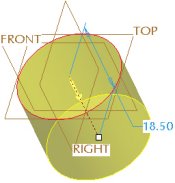
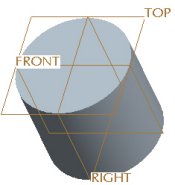
An existing sketch can be used by the Extrude Tool to create a solid feature. This is often referred to as an ExternalSketch. The resulting extrude feature is dependent on the selected sketch feature.
Task 2-15. Create an Extruded protrusion using the previous sketch.
Press CTRL + D to orient to the standard orientation.
Click Datum Planes from the main toolbar to enable their display.
With the sketch still selected (highlighted in red), start the Extrude Tool from the feature toolbar.
Drag the depth handle upward to approximately 20.
Double-click on the depth dimension, and enter 18.5.
Click on the yellow arrow to flip the direction of feature creation downward.


 Previous


 from the main toolbar to enable their display.
 from the feature toolbar.
  .
.