 |
|
|
Regenerating Models
In addition to using the toolbar icon, you can also press CTRL + G as a shortcut to Regenerate. |
|
| Task 1-14. Edit the depth of the RIGHT_END and observe the LEFT_END update. |
- Select the RIGHT_END protrusion from the model, right-click and select Edit.
- Double-click on the 12 dimension and enter 7.
- Press CTRL + G to regenerate the model.
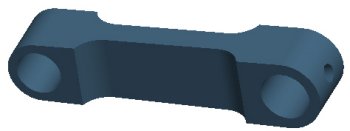
Figure 14: Model Edited |
- Click Undo
 from the main toolbar to return to a depth of 12. from the main toolbar to return to a depth of 12.
- Click Redo
 from the main toolbar to return to a depth of 7. from the main toolbar to return to a depth of 7.
- Click File > Close Window
 twice to close both windows. twice to close both windows. |


 Previous

