 |
|
|
Redefining Features
Changing feature options, such as Depth can be quickly defined using Dashboard icons or by right-clicking on the depth handle. |
|
| Task 1-13. Redefine a second extruded protrusion. |
- Redefine the LEFT_END feature as shown in the following figure:
- Select the LEFT_END protrusion from the model tree.
- Right-click, and select Edit Definition.
- Select the Options tab from the dashboard.
- Specify To Selected for Side 1, and then select the front surface of the RIGHT_END protrusion as shown.
- Click Complete Feature
 from the dashboard. from the dashboard.
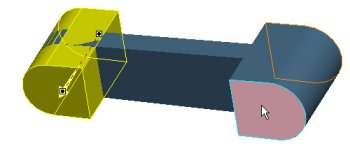
Figure 13: Redefining Depth | |


 Previous

