Previous Page 20 of 89 Next
Information

Selecting Items From a List

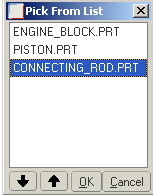
The Pick From List option allows you to select from a text list.

Press and hold the right mouse button briefly to activate popup menus such as Pick From List.

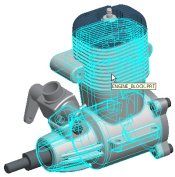
Task 1-8. Select components from the model using Pick From List.

  1. Place the cursor over CONNECTING_ROD.PRT, right-click and hold, and then select Pick From List.
    1. Select CONNECTING_ROD.PRT from the Pick From List dialog box and click OK.


Selecting CONNECTING_ROD.PRT

  1. Cursor over CRANKSHAFT.PRT and select it. This selection has replaced the previous one.
  2. Click in the graphics window to de-select all components.

Note
Repainting the screen does not de-select items.

Previous Home Next