Assembly Load Options (NX)
Assembly Load Options enable you to change the load option of the model when it is opened from Windchill to NX.
To access the assembly load options,
• In the NX Home tab, click > > > .
Alternatively,
• Click > > . The Assembly Load Options window opens.
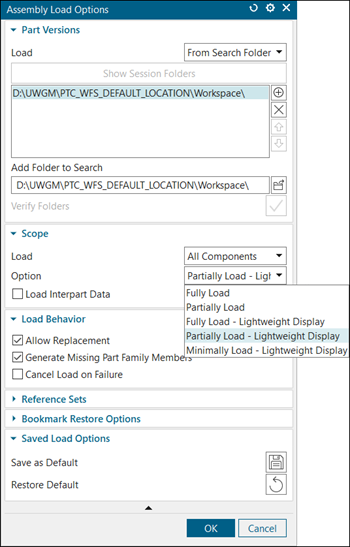
Supported Loads for Importing NX Files into Windchill
When importing NX files into Windchill, the options for loading are available under the Part Versions group in the Assembly Load Options window as shown:
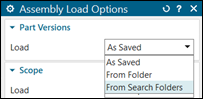
• As Saved—Opens the NX assembly and its components from their most recently saved location. It keeps track of the folder location where the components were saved. This data is not stored in Windchill.
• From Folder—Opens an NX CAD file from a local folder. This option can be used when all the CAD documents are present in a single local folder.
• From Search Folder—This is the default load when NX is connected to Windchill Workgroup Manager. The folder path to the active workspace is added by default.
Supported Loads for Opening Windchill CAD documents in NX
When opening Windchill CAD documents in NX, the options for loading are available under the Scope group as shown:
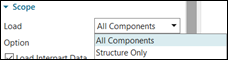
• All Components—Opens all components of an assembly.
• Structure Only—Opens the assembly structure only. No components are loaded. When you open an assembly from the commonspace using the Structure Only load type, by default all the dependents from Windchill are automatically added to the workspace along with the assembly.
To get optimal performance with the Structure Only option, set the Dependents value to None in the Basic tab while adding objects to workspace.
Alternatively,
a. Navigate to > > > .
b. Set the Include Dependent CAD / Dynamic Document preference to None.
Supported Options for Opening Windchill CAD documents in NX
The options are available under the Scope group as shown:
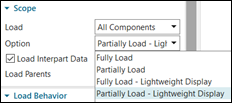
• Fully Load
• Partially Load
• Fully Load - Lightweight Display
• Partially Load - Lightweight Display
You can also set the load options in the load_options.def configuration file in the NX Start directory. For example, to set the load options to Fully Load, set the LoadOptions_PartLoadOption: fully_load preference in the load_options.def configuration file.
 | To change the location of load_options.def configuration file, you can set the UGII_LOAD_OPTIONS environment variable as follows: UGII_LOAD_OPTIONS=D:\NX_loadoptions\load_options.def. |
For more information, see Best Practices: Opening NX CAD Data from Windchill.