Classification Tab
This topic provides change planning support for the Engineering BOM definition, which includes the classification data associated with part versions.
The classification data is displayed in the Classification tab.
The Classification tab is visible when the selected part is a BOM redline. It is hidden if the selected part is a part master in the redline structure tree. Out-of-the-box, the tab appears after Attributes, but you can change the sequence by dragging the tab.
 |
This tab is only available when Windchill PartsLink Classification and Reuse is installed. It is visible even if the part is not classified.
|
Classification in Windchill is a method for organizing object classes. It involves defining objects, associating attributes with them, and providing a basis for navigation structures. The classification structure is represented as a tree, which can be managed using various actions such as expanding, collapsing, inserting, deleting, copying, pasting, exporting, and importing nodes. This structure is essential for effectively organizing and navigating through different object classes. For more information, see Working with Classification Administration.
The BOM redline uses the same user interaction for classification as what is available in the Product Structure Browser.
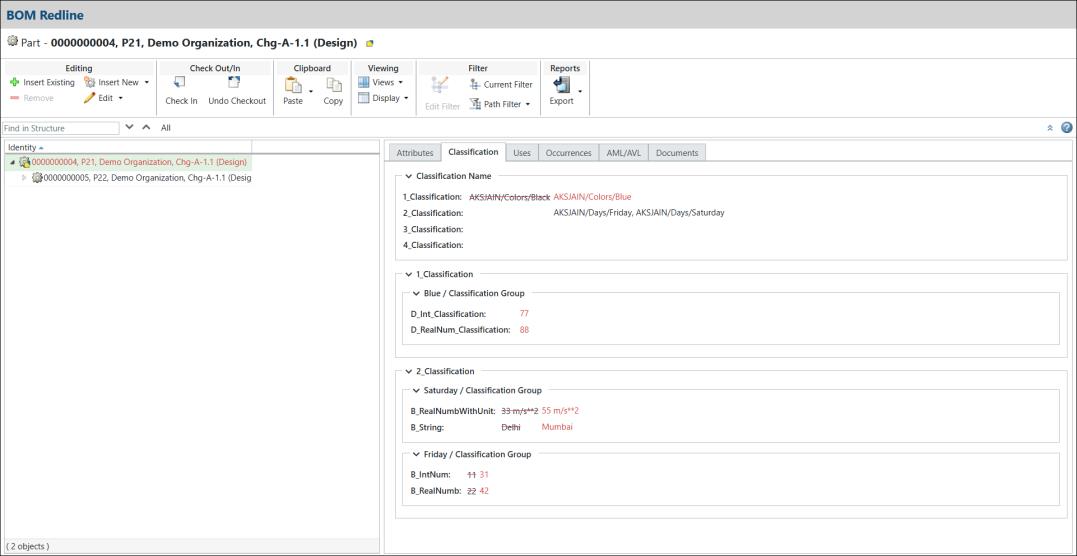
From the redline actions toolbar, you can reassign, add, edit, or remove the Classification Nodes and Classification Attributes values in the Classification tab. After performing these actions, the corresponding part in the redline tree is highlighted in red.
The Classification tab follows the standard redline process practices. Merging the redline with the affected object version and synchronizing it with the latest released resulting object follow the same conventions. For more information, see the Redline Process topic.
When you delete the entire BOM redline, including the parent and child redlines, the Classification information is also deleted.
Attributes Description
The Classification tab displays the following information:
Attributes | Description |
|---|---|
Classification Node | Classification nodes (or “classes”) are the building blocks of the classification structure. |
Classification Attribute | A reusable attribute represents a unique system-wide property for which an object instance can have a value. |
Classification Change Tracking Color Indicator
The following colors indicate the old and updated values after modifications:
Color | Description |
|---|---|
Red | Indicates updated attribute values in the Classification tab and structure tree. |
Red Strikethrough | Indicates old attribute values. |
Related Topics