Search Using Revision and Iteration Criteria
Windchill uses object versions to capture a historical record of modifications made to data objects such as parts and documents.
A version identifier such as A.1 is composed of a revision A and an iteration 1. A new revision is created whenever an object is revised. A new iteration is created when an object is checked out and checked back in. For more information, see Object Versions.
 |
• Revision sequences are only applicable to objects located in a product or library. You cannot revise project or program objects.
• The examples in this topic use an alphabetical revision sequence and numeric iterations, but your site administrators might implement a customized revision sequence.
|
You can use the advanced search criteria or the Latest Version Search preference to extend your search to include all, the latest, or the absolute latest version of objects. Additionally, you can specify the revision or iteration of the Windchill object in the Criteria panel. For more information on using the Criteria panel, see Criteria.
|
|
By default, Windchill only searches against the latest iteration of every revision based on the criteria. Non-latest iterations are ignored. While you can use the Iteration field to include non-latest iterations in an indexed keyword search, the default search criteria is only compared against the latest iteration. The Iteration field is more useful if you want to include all iterations or a specific iteration. If the search includes additional attribute criteria, you might see unexpected results. For more information, see Non-Latest Iterations Using Multiple Criteria.
|
You can select one of the following values in the Latest Version Search preference or from the list in the Revision and Iteration criteria in the Criteria panel:
• All: (Default). When selected, the search returns all versions that match the specified search criteria.
• Latest: When selected, the search returns the latest version that matches the specified search criteria.
• Absolute Latest: When selected, the search returns a result only if the recent most version matches the search criteria. This option is displayed as Absolute in the Criteria panel on the Advanced Search page.
|
|
The visibility of the absolute latest version of an object is determined by your permissions. If you do not have access to the absolute latest version, the Search Results table does not display any result.
|
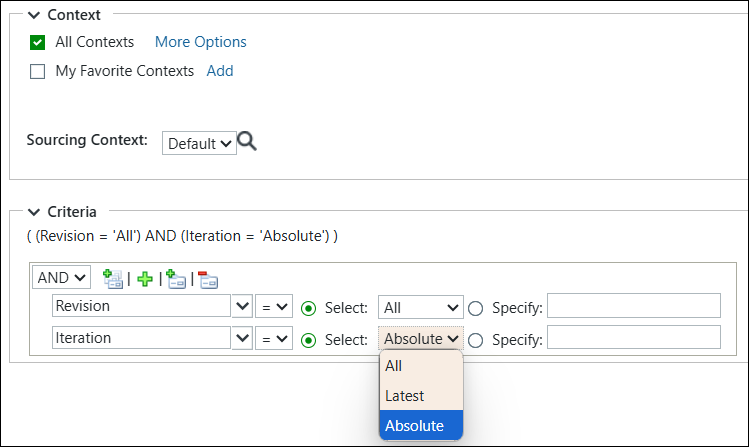
Many of the following examples use various values for revision, iteration, state, and classification attributes in the Criteria panel. The Criteria panel uses the AND operator. Some of the examples include keyword search in addition to the database search.
| | • See Advanced Search Examples for an explanation of the formatting used in the tables. • If you are performing a keyword search with indexing enabled, and you want to search for non-latest iterations with additional criteria (such as all iterations in a certain state), then your search might return unexpected results. For more information, see Non-Latest Iterations Using Multiple Criteria. |
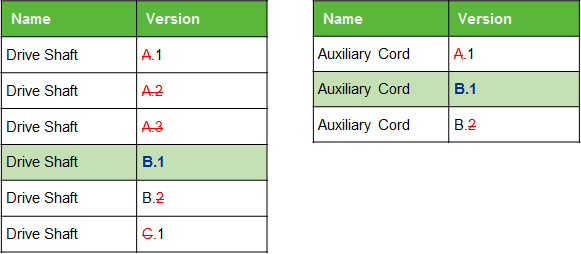
Specifying Revision and Iteration
Perform a search using the following Criteria:
• Revision=B
• Iteration=1
The following results are returned:
Specifying Revision for All Iterations
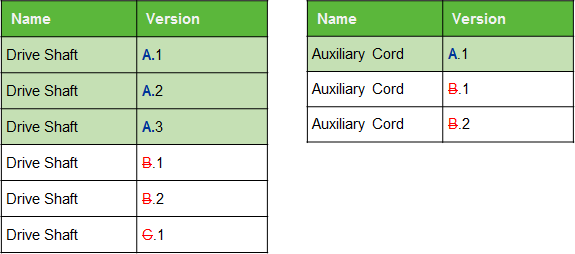
You perform a search using the following Criteria:
• Revision=A
• Iteration=All
The following results are returned:
Selecting a State for the Latest Version
In this example, you perform a search using the following attributes under Criteria:
• State=Released
• Revision=Latest
• Iteration=Latest
The following results are returned:
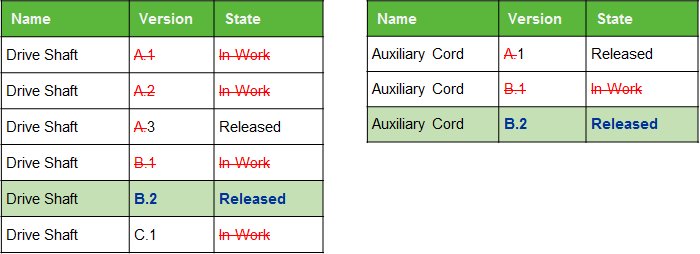
This search returns the latest version that fulfills all search parameters. For example, if you change the state of Drive Shaft C.1 to Released, then version B.2 would no longer appear in the results.
Selecting a State for All Revisions
In this example, you perform a search using the following attributes under Criteria:
• State=Released
• Revision=All
• Iteration=Latest
The following results are returned:
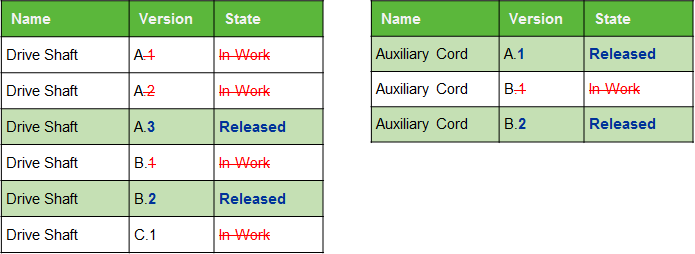
 | If your Latest Version Search preference is set to All, then you need not specify Revision=All or Iteration=Latest. This is already the default behavior. The Iteration=Latest parameter is implicit in every search. However, if your Latest Version Search preference is set to Latest, then setting Revision=All along with search criteria would increase your number of search results. |
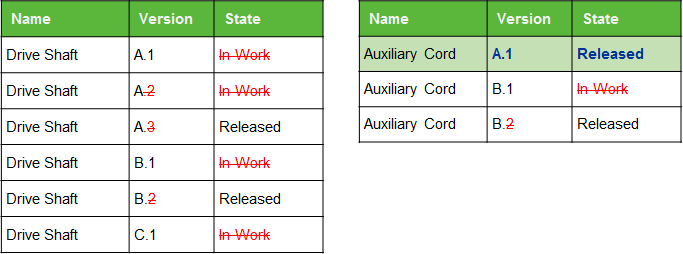
Specifying Iteration for a Selected State and the Latest Revision
In this example, you perform a search using the following attributes under Criteria:
• State=Released
• Revision=Latest
• Iteration=1
The following results are returned:
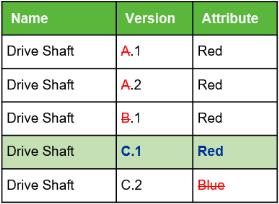
Specifying a Classification Attribute for the Latest Revision and All Iterations
In this example, you perform a search using the following attributes under Criteria:
• Classification=Red
• Revision=Latest
• Iteration=All
The following result is returned:
Specifying Keywords for All Revisions
| | If you perform a keyword search only, the value of the Latest Version Search preference determines the search results. If you perform a keyword search with additional criteria, then the values of Revision and Iteration in the Criteria panel overrides the Latest Version Search preference value. |
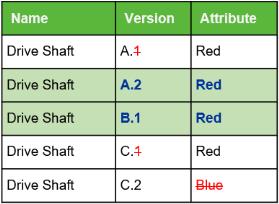
In this example, you perform a search using Keyword as Red and select a value for the following attributes in Criteria:
• Revision=All
• Iteration=Latest
The following results are returned:
Specifying Keywords for the Latest Revision and All Iterations
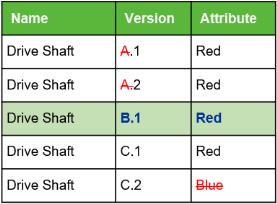
In this example, you perform a search using Keyword as Red and select a value for the following attributes in Criteria:
• Revision=Latest
• Iteration=All
The following result is returned:
Specifying Keywords for the Latest Version
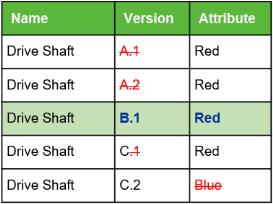
In this example, you perform a search using Keyword as Red and select a value for the following attributes in Criteria:
• Revision=Latest
• Iteration=Latest
The following result is returned:
Specifying Keywords for the Absolute Latest Version
See the following examples to understand the scenario.
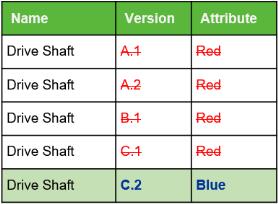
In this example, you perform a search using Keyword as Red and select a value for the following attributes in Criteria:
• Revision=Absolute
• Iteration=Absolute
No result is returned:
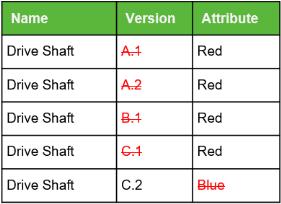
In this example, you perform a search using Keyword as Blue and select a value for the following attributes in Criteria:
• Revision=Absolute
• Iteration=Absolute
The following result is returned: