Working with Standard Collection Operations
The two main subtypes of operation are:
• Standard Operation — For more information, see Working with Standard Operations and Managing Standard Operations.
• Standard Collection Operation
The following are the two subtypes of standard collection operation:
•  Standard Buy- Off Operation — Standard buy-off operations represent formal approval by a technician or supervisor. Buy-offs involve obtaining formal approval from one or more qualified individuals to verify the completion of specific tasks. Buy-offs ensure that all necessary checks and validations have been performed before proceeding further. Use the standard buy-off operation to enforce formal approvals at critical process checkpoints.
Standard Buy- Off Operation — Standard buy-off operations represent formal approval by a technician or supervisor. Buy-offs involve obtaining formal approval from one or more qualified individuals to verify the completion of specific tasks. Buy-offs ensure that all necessary checks and validations have been performed before proceeding further. Use the standard buy-off operation to enforce formal approvals at critical process checkpoints.•  Standard Data Collection Operation — Data collection is crucial for maintaining high standards of quality and compliance during manufacturing. It involves recording specific measurements and information at various stages of the production process. These measurements are often aligned with the characteristics of the products being made. Use the standard data collection operations to capture and validate process-specific measurements during manufacturing. You can validate data directly on the shop floor using this operation. This operation enables you to categorize the different data collection items.
Standard Data Collection Operation — Data collection is crucial for maintaining high standards of quality and compliance during manufacturing. It involves recording specific measurements and information at various stages of the production process. These measurements are often aligned with the characteristics of the products being made. Use the standard data collection operations to capture and validate process-specific measurements during manufacturing. You can validate data directly on the shop floor using this operation. This operation enables you to categorize the different data collection items.The main purpose of standard data collection operations is to capture specific parameters such as thickness, temperature, voltage, and so on. A standard data collection operation supports a maximum of two standard control characteristics (SCCs): one regular SCC and one in-context SCC. You cannot assign more than one SCC of the same type.
You can use the standard buy-off operations and standard data collection operations to ensure enhanced quality, traceability, and operational efficiency. They support quality assurance and compliance on the shop floor.
 | The Standard Collection Operation serves primarily as a placeholder. Key functionalities are implemented using the Standard Buy- Off Operation and Standard Data Collection Operation. |
Key Points
• Standard data collection operations can be added only under a standard or regular operation.
• Standard buy-off operations can be added only under a standard or regular operation.
• A standard data collection operation supports a maximum of two standard control characteristics (SCCs): one regular SCC and one in-context SCC. You cannot assign more than one SCC of the same type.
• Child nodes are not supported for standard buy-off and data collection operations. That is, the system does not allow you to create any child operation holder under a standard data collection operation or under a standard buy-off operation. This includes other operations and standard procedures.
• You can also create reusable catalogs of standard data collection operations and standard buy-off operations under a manufacturing standard group. This helps streamline a process plan creation. The buy-off catalog includes predefined buy-off types. For example, BO1, BO2, BO3, BO4, and so on. The data collection catalog includes parameters like temperature, voltage, vibration level, and serial number.
• Contextual assignment of standard control characteristics — Standard control characteristics must be assigned in context with the main operation (for example. a frame building) rather than auxiliary operations like data collection. This ensures that ownership and relevance are maintained. For example, an SCC related to weld seam thickness is assigned to the frame building operation, not to the data collection operation.
• Skill linkage and buy-off operations —Buy-off operations can be linked to specific skills to enforce quality checks. For example, a welding quality buy-off operation is linked to the Weld Inspector skill. Approval by the inspector is mandatory before proceeding. Buy-off operations can also be used independently when data collection is not required. For example, for rear and front wheel installation, only a buy-off operation is used, requiring approval from an Assembly Technician.
• Selective data collection—Manufacturers can selectively apply DC operations based on the nature of the task. For example, a seat installation requires height data collection, while handlebar installation does not, due to its fixed dimensions.
Inserting Standard Data Collection Operations
You can insert multiple standard data collection operations by using specific actions available in the process plan browser. Some of these actions include: Insert, Insert Existing, Insert Operations, and Insert Operations After. You can insert a single standard data collection operation by using only the New Operation action in the process plan browser.
| | • When you initiate any of these actions, you must select Standard Data Collection Operation in the Type field of the respective dialog box. • When you insert multiple standard data collection operations, the system assigns default values to mandatory attributes, and optional fields receive predefined initial values. When you insert a single standard data collection operation, you must manually provide values for mandatory fields. Mandatory attributes are the fields that display a star symbol in front of them. |
Inserting a Single Standard Data Collection Operation
1. Select a valid operation holder and initiate the New Operation action in the process plan browser. Here, the operation holder can only be a regular or standard operation.
2. In the Type field of the New Operation dialog box, you must select Standard Data Collection Operation.
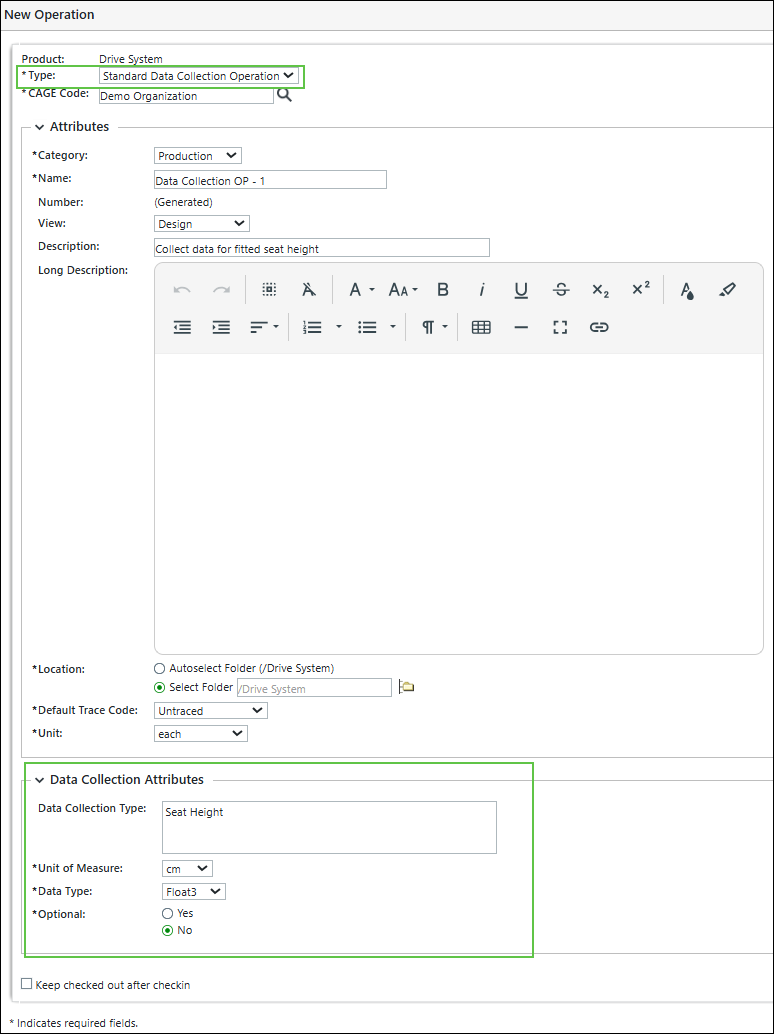
3. For a standard data collection operation, the Attributes and Data Collection Attributes section is displayed.
| | The information about most of the attributes displayed in the New Operation dialog box is described in the Creating a Standard Operation topic. |
4. The following attributes are present in the Data Collection Attributes section:
◦ In the Data Collection Attributes section, you can use the Data Collection Type field to categorize the different data collection items.
◦ The Unit of Measure attribute specifies the units in which the collected information will be expressed. For example, Inch, Celsius, Ohms, and so on.
◦ The Data Type attribute is used to specify the data type for the information being collected. Out-of-the-box (OOTB) supported data types include Boolean, String, Integer, Float1 through Float6. The number following Float indicates the number of decimal places expected by the downstream system when the user enters data.
◦ The Optional attribute controls whether the standard data collection operation is mandatory or optional.
Behavior Based on Optional Attribute
Value | Operator Behavior |
|---|---|
Yes | You may proceed to the next operation without entering data. |
No | You are blocked from proceeding until data is entered. |
5. Click OK to close the New Operation dialog box.
When the process is complete, the Standard Data Collection Operation is displayed under the operation holder.
Standard Data Collection Operation is displayed under the operation holder.Inserting Multiple Standard Data Collection Operations
You can use multiple actions to insert multiple standard data collection operations at once.
1. Select a valid operation holder and initiate the Insert Operations action in the process plan browser. Here, the operation holder can only be a regular or standard operation.
2. In the dialog box, enter the number of operations to be inserted.
3. In the Type field of the dialog box, select Standard Data Collection Operation.
4. Click OK. The dialog box closes, and multiple standard data collection operations are displayed under the operation holder.
standard data collection operations are displayed under the operation holder.Inserting Standard Buy-Off Operations
You can insert multiple standard buy-off operations by using specific actions available in the process plan browser. Some of these actions include: Insert, Insert Existing, Insert Operations, and Insert Operations After. You can insert a single standard buy-off operation only by using the New Operation action in the process plan browser.
| | • When you initiate any of these actions, you must select Standard Buy-Off Operation in the Type field of the respective dialog box. • When you insert multiple standard buy-off operations, the system assigns default values to mandatory attributes, and optional fields receive predefined initial values. When you insert a single standard buy-off operation, you must manually provide values for mandatory fields. Mandatory attributes are the fields that display a star symbol in front of them. |
Inserting a Single Standard Buy-Off Operation
1. Select a valid operation holder and initiate the New Operation action in the process plan browser. Here, the operation holder can only be a regular or standard operation.
2. In the Type field of the New Operation dialog box, you must select Standard Buy-Off Operation.
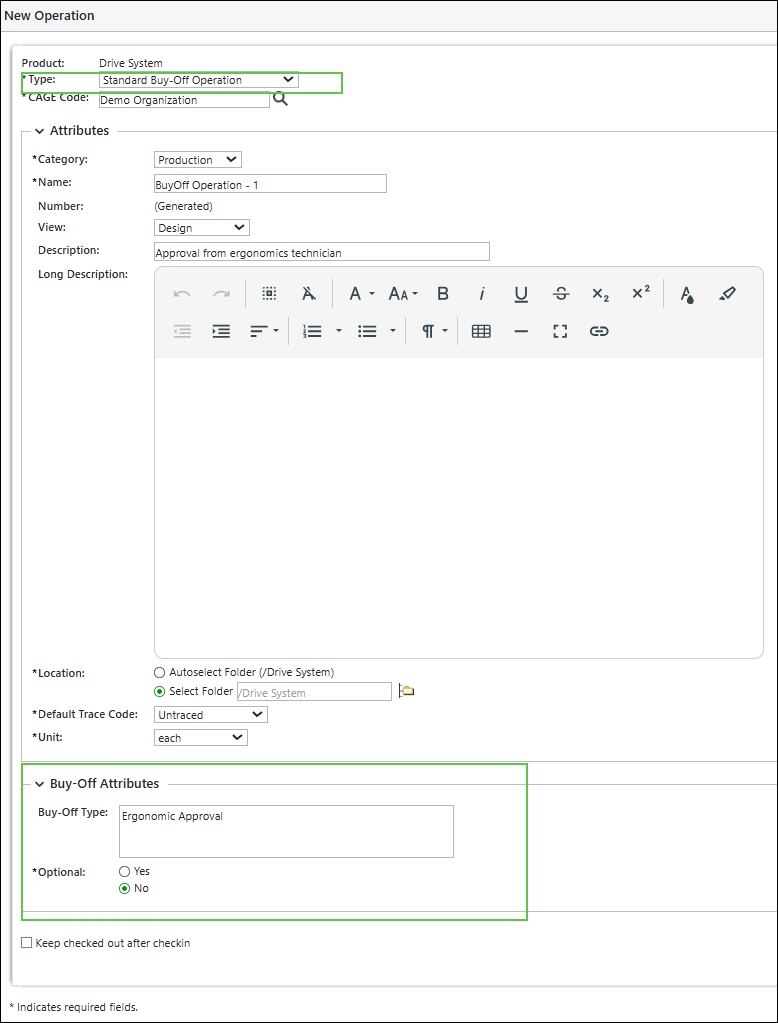
3. For a standard buy-off operation, the Attributes and Buy-Off Attributes section is displayed.
| | The information about most of the attributes displayed in the New Operation dialog box is described in the Creating a Standard Operation topic. |
4. The information about the attributes displayed in the Buy-Off Attributes section is as follows:
◦ In the Buy-Off Attributes section, you can use the Buy-Off Type field to categorize the type of buy-off applied to the operation.
◦ The Optional attribute controls whether the standard buy-off operation is mandatory or optional. When the value is set to Yes, you can proceed to the next operation without approval. In contrast, when the value is set to No, you cannot proceed until approval is granted.
5. Click OK to close the New Operation dialog box.
When the process is complete, the Standard Buy- Off Operation is displayed under the operation holder.
Standard Buy- Off Operation is displayed under the operation holder.Inserting Multiple Standard Buy-Off Operations
You can use multiple actions to insert multiple standard buy-off operations at once.
1. Select a valid operation holder and initiate the Insert Operations action in the process plan browser. Here, the operation holder can only be a regular or standard operation.
2. In the dialog box, enter the number of operations to be inserted.
3. In the Type field of the dialog box, select Standard Buy-Off Operation.
4. Click OK. The dialog box closes, and multiple standard buy- off operations are displayed under the operation holder.
standard buy- off operations are displayed under the operation holder.Downstream Execution in the Context of MPMLink
MPMLink serves as a configuration tool for defining process plans, specifying operation sequences, and configuring attributes, such as buy-off and data collection requirements. These configurations do not execute any manufacturing tasks directly. Instead, they guide downstream systems, which are responsible for actual execution on the shop floor.
When you create a process plan in MPM Link, you define a structured list of operations required to assemble a product. Each operation can include work instructions that direct the operator to perform specific tasks, such as assembling parts or validating measurements. These instructions are part of the configuration, and they do not trigger any real-time actions within MPMLink.
Execution occurs in downstream systems such as MES or Connected Work Cell. These systems consume the process plan configured in MPMLink and enforce the operational logic during actual manufacturing. For example, MES downloads the process plan and presents each step to the operator. The operator follows the instructions and enters data as required. If a buy-off is configured, the system ensures that approval is obtained before proceeding. If data collection is required, the system prompts the operator to enter measurements and validates them against predefined parameters.
The behavior of the downstream system depends on how you configure attributes in MPMLink. When you set the value of the Optional attribute to No, the downstream system blocks execution until the required approval or data entry is completed. When you set it to Yes, the operator can proceed without fulfilling those conditions. This configuration allows you to control enforcement without embedding execution logic directly in MPMLink.
MPMLink does not store or validate execution data. It only defines what must be collected or approved. The downstream system interprets this configuration and applies the necessary rules during execution. This separation ensures clarity between configuration and execution responsibilities.
You can use this understanding to document operations accurately. Note that MPMLink defines the structure and rules, while MES or other systems perform the actual tasks. This distinction helps you avoid confusion and ensures that documentation reflects the true behavior of the system.