Working of SCCs with Standard Operations and Standard Collection Operations
The two main subtypes of operation are:
• Standard Operation — For more information, see Working with Standard Operations and Managing Standard Operations.
• Standard Collection Operation
The following are the two subtypes of standard collection operation:
•  Standard Buy-Off Operation
Standard Buy-Off Operation•  Standard Data Collection Operation
Standard Data Collection Operation | In the following sections, the term standard operation refers to the following types of operations: • Standard operations • Standard data collection operations • Standard buy-off operations |
Assigning Standard Control Characteristics to Standard Operations
You can assign standard control characteristics (SCC) to standard operations in two ways:
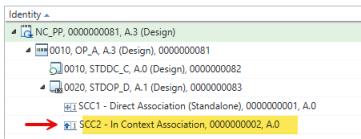
• In-Context SCC assignment — When you assign an SCC to a standard operation that is part of a process plan tree, the system treats it as an in-context assignment. In this case, the SCC links to the main operation. The system checks out the context operation during in-context SCC assignments. It does not check out the standard operation. This assignment refers to linking an SCC to a standard operation that is used within the context of a parent operation—such as a main operation or process plan. To perform this assignment, you must open the parent operation as the root node in the Process Plan Browser (PPB). The SCC is displayed under the standard operation in the PPB tree with a different icon to indicate its in-context nature. During this process, the context operation is checked out, while the standard operation remains checked in. This method ensures that SCCs are applied uniquely within each usage scenario and remain relevant to the specific operational context. However, in-context SCCs are not retained when the standard operation is copied or moved, as the context changes. The different icon for the in-context SCC’s is only visible in the process plan tree structure.
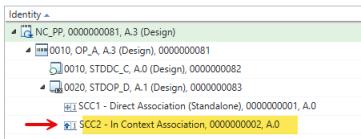
• Standalone Assignment — When you open a standard operation as the root node of the process plan tree, the system treats it as a standalone entity. In this case, the SCC links directly to the standard operation. This assignment behaves differently from the in-context scenario. You can assign SCCs either by opening the operation as the root node and using the actions in the Control Characteristics tab or by navigating through the Related Objects tab to access the Control Characteristics table. This method ensures that the SCC remains linked to the standard operation, standard buy-off operation, or standard data collection operation even when it is copied or moved within the process plan structure.
| | For in context SCCs that are added under standard operation, when performing actions such as Insert New, Insert Existing, Copy, Paste for SCCs, the standard operation remains checked in. The parent entity, either the process plan or operation holder, gets checked out. This behavior applies to multiple entities, including process plans, operation and sequences. For more information, see Control Characteristics Tab. |
Working with Context and Standard Operations in the Process Plan Browser
In the Process Plan Browser, you manage process plans that contain operations. A regular operation may include a standard operation. Standard operations are released objects. You do not check them out or modify them during routine tasks. These operations are not tied to usage links. Instead, they are associated with context operations.
A context operation refers to an operation that exists within a specific process plan context. In Windchill, the term “context” identifies the operational scope in which the standard operation is applied.
You can link a standard control characteristic to a standard operation. The link may occur in context or as a standalone entity. The type of link depends on the placement of the standard operation within the process plan tree.
When you assign in-context standard control characteristics, they are not reused across all instances of a standard operation. Each in-context SCC is unique to its assignment. The system displays a distinct icon to indicate this behavior.
SCC Behavior with Standard Operations
• When you copy a standard operation that includes standard control characteristics (SCCs), only directly associated SCCs to standard operations are retained with it. SCCs linked to in context operations are not preserved because the context changes during the copy action. This behavior ensures that in-context SCCs remain relevant to their operational context.
• If you duplicate a standard operation, the system creates a new object. Standalone SCCs which are linked to standard operations are duplicated and associated with the new standard operation. However, in-context SCCs are not recreated, as the new context may not require them. This prevents unnecessary or incorrect SCC associations.
• When you move a standard operation within the process plan tree—either by reparenting or reordering—direct SCCs linked with standard operations remain unchanged. In-context SCCs are retained, but the system updates their backend references to reflect the new operational context path. This ensures accurate linkage and traceability.
• Moving an context operation does not affect SCC associations. SCCs linked to standard operations under the context operation remain intact. Reordering operation holders under the same parent also preserves SCC associations without requiring changes.
• In all cases, the system automatically checks out affected entities such as the parent operation, the process plan, and any impacted children. This behavior supports consistent SCC management across copy, duplicate, move, and reorder actions.
| | All in-context SCCs created for standard operations—when used within a context operation such as regular operations or sequences—are displayed under the corresponding standard operation in the process plan tree structure. |
In-Context SCC Assignments for Standard Operations
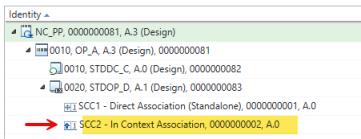
When working with standard operations nested under a context operation (such as a main operation or process plan), SCC assignments behave differently from standalone assignments. These are referred to as in-context SCC assignments. All the SCC-related actions, such as Insert New, Insert Existing, Copy, Paste, and other supported operations, follow a consistent behavior pattern when applied to standard operations in context. Specifically, the SCC is linked to the context operation without checking out the standard operation. Despite this, the SCC is displayed under the standard operation in the Process Plan Browser (PPB) tree using a different icon to indicate its in-context nature. This behavior applies uniformly across all supported SCC actions.
For more information, see Control Characteristics Tab.