Removing an Illustration
One or more illustrations can be associated with an operation. Use the  Remove Illustration action available in the right-click menu of an operation to remove the associated C3DI files and reference documents from the Process Plan Browser.
Remove Illustration action available in the right-click menu of an operation to remove the associated C3DI files and reference documents from the Process Plan Browser. | When working in the Process Plan Browser, you can only remove illustrations that were created in the Process Plan Browser. To remove illustrations created in other browsers, such as the Advanced Manufacturing Resource Browser, you must open the respective browser and delete the illustrations. |
To remove an illustration, perform the following steps:
1. In the Process Plan Browser tree structure, right-click an operation.
The context menu opens.
2. In the context menu, select > Remove Illustration.
Remove Illustration.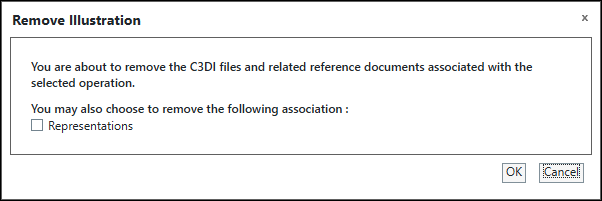
3. In the Remove Illustration dialog box, select the Representations checkbox if you want to remove the representations associated with the selected operation, and then click OK.
4. If there is only one illustration associated with the operation, the system removes the illustration. If multiple illustrations are associated with an operation, a message appears. Click Yes to remove all illustrations.
The illustrations created using the Process Plan Browser and associated with the selected operation are removed by default. The records of the illustrations are also removed from the References Documents table on the Documentation tab.
When you perform this action on a parent operation, the illustrations associated only with the parent operation are removed by default. However, when the illustrations are managed from the parent operation (the property com.ptc.windchill.mpmlink.manageCreoIllustrationFromParentOperation is set to true), removing the illustration from the parent operation also removes the reference documents published by the Creo Illustrate publishing process for the associated child operations. For more information on the property, see Managing Illustrations from Parent Operations.
Using the Remove Action in the References Documents Table
You can use the Remove selected action available in the References Documents table toolbar of the Documentation tab to remove illustrations selectively.
Remove selected action available in the References Documents table toolbar of the Documentation tab to remove illustrations selectively.1. Select one or more illustrations and click .
.Alternatively, you can use the right-click actions menu and select Remove.
2. In the Remove dialog box, click OK.