Simple Windchill Deployments
The following graphic illustrates an example of a simple Windchill deployment with only a test (pre-production) system and a production system.
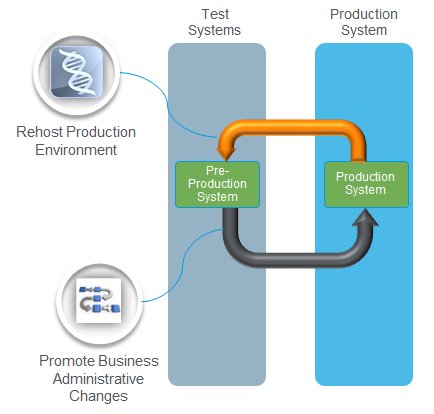
In this scenario, the production system data and configuration are cloned to the pre-production system by using the Windchill Rehost Utility. This rehosting action is represented by the orange arrow at the top of the diagram. Initially, both systems are identical. After rehosting, you establish a baseline from which changes can be tracked. You can then register the production system as the target system.
If an administrative change is required, such as adding a new profile, implement the change first in the test system. For example, you can add users to the profile on the test system to verify that it is set up correctly. After testing is complete, you can promote the change to the production system by using the Business Administrative Change UI utility. This action is represented by the gray arrow at the bottom of the diagram.
To promote the change, export all changes since the established baseline. In this example, the only change is the new profile. The changes are exported to a ZIP file, which you can copy to the production server and import into the production system by using the Business Administrative Change UI utility. After import, the new profile is available in the production system.