Complex Windchill Deployments
The following graphic illustrates an example of a complex Windchill deployment that includes development, integration, test, and production systems.
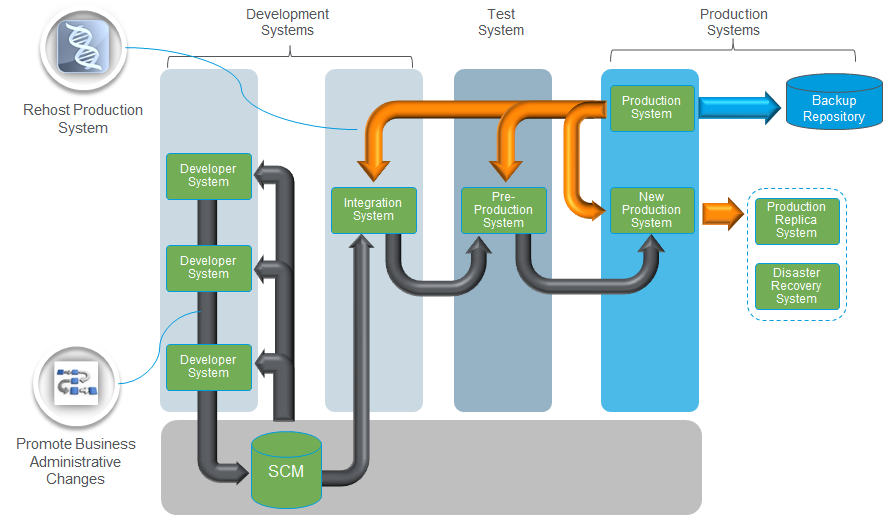
In this scenario, the production system data and configuration are cloned to the pre-production and integration systems by using the Windchill Rehost Utility. This rehosting action is represented by the orange arrows at the top of the diagram. Initially, the integration system, pre-production test system, and the production system are identical.
Multiple developer systems are also created independently. These systems do not include all the data and configuration from the production system. Developer systems are often hosted locally on a developer’s computer, which typically cannot store the full volume of data from a production environment.
 | The rehosting action is available in selective mode. When performing BAC rehosting, you must include the WPA module because it creates the PTC_WNC_internal repository in the target system. After rehosting, verify that this repository is created and the GUIDs listed in the local repository of the source and target systems match. |
Before making administrative changes, establish a baseline on each cloned (or synchronized) system from which administrative changes will be exported. In the diagram, a baseline is established for the integration and pre-production test systems.
• The production system does not require a baseline because changes are not exported from it.
• Developer systems do not require a baseline because they do not share common data with other systems.
After establishing baselines on the required systems, use the Business Administrative Change UI utility to register target systems. For example:
• A developer system registers other developer systems and the integration system.
• The integration system registers the pre-production system.
After all systems are registered, administrative changes can be made and tracked.
After changes to administrative objects are completed and validated, export the changes to the next system using the Business Administrative Change UI utility. The exported ZIP file includes:
• Newly created objects
• Changes to existing objects since the established baseline
Copy the ZIP file to the next system and import the changes for testing. This process continues until the changes reach the production system, where they become available to all Windchill users.