Load Behavior Options for Containers (Creo Elements/Direct Modeling)
Creo Elements/Direct Modeling has the capability to control the loading of container assemblies. You can speed up the loading process by avoiding loading of containers in session and large number of objects in the structure browser.
When loading initial data from Windchill to Creo Elements/Direct Modeling, the mode of loading the containers, full mode or partial mode, is controlled by the load.containers.full.mode preference in the wgmclient.ini file. Setting the load.type.default preference to Full is a prerequisite for the settings specified in load.containers.full.mode preference to take effect. The mode in which data is loaded to containers depends on the values set for the preferences, as explained below:
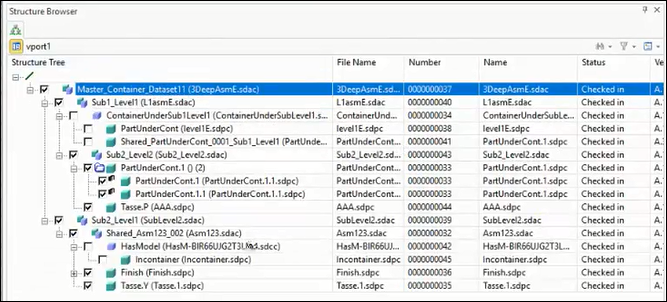
• When both the preference are set to default value, that is load.type.default is set to Full and load.containers.full.mode is set to Yes, the non-containers and containers are loaded in Full load. The following image displays the containers dataset loaded in Full.
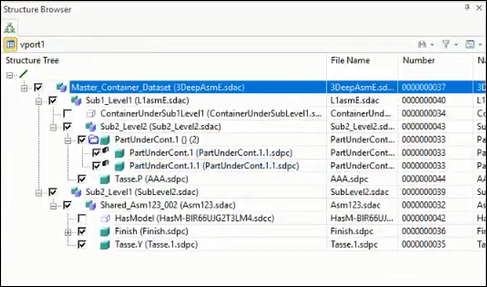
• When load.type.default is set to Full and load.containers.full.mode is set to No, then only a single structural node for the container is loaded in Partial and non-containers are loaded in Full. The following image displays the container dataset loaded in Partial.
• When load.type.default is set to a value other than Full, for example Structure, Partial, or Lightweight, containers are always initially loaded in Partial regardless of the value set for load.containers.full.mode.
• If the container is loaded in any load type other than Partial, its load type changes when the load type of its parent assembly is changed.
 | For more information on changing the load type of containers, see Change Load Type (Creo Elements/Direct Modeling). |
Loading Data from CAD tool through Open from Windchill Window
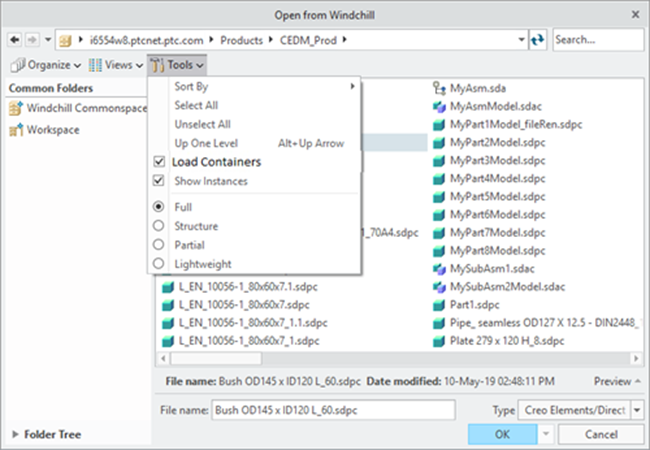
You can view and change the values of load.containers.full.mode and load.type.default preferences in this workflow. The load options are available from > . The Load Containers option and Full (complete data) load option are selected by default based on the preference value set in wgmclient.ini. Selection of different available option is possible in this window. The following image displays the Open from Windchill window.
Loading Data from Workspace or Commonspace (HTML User Interface)
The values set for load.containers.full.mode and load.type.default preferences in the wgmclient.ini file are honored when the data is loaded from HTML user interface.
Loading Data for Close and Update from Conflicts Dialog box
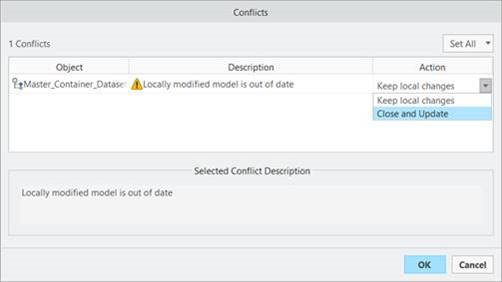
When you select the Close and Update option for the respective conflict object in the Conflicts dialog box, the model in session is replaced with the Windchill database model. The Conflicts dialog box is displayed as follows.
In the Close and Update workflow, all data within the session retains its previously assigned load type after the Close and Update action is performed. Any newly added data will be loaded in the Full load type.
| | The bahavior of child containers in the Close and Update workflow is different, For more information, see Behavior of Child Containers with Load Types. |
Loading Data for Reload from Conflicts Dialog box
When you select the Reload option for the respective conflict object in the Conflicts dialog box, the model in session is replaced with the Windchill database model. The Conflicts dialog box is displayed as follows.
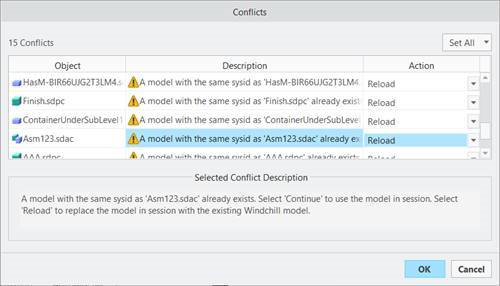
In this case, the containers and non-containers are loaded in Full load regardless of the value set in the load.type.default and load.containers.full.mode preferences.
Load Change Behavior while Assigning New SysID
If the parent assembly, sub-assembly, or container is loaded in Full, and its child objects are in Partial, Structure, or Full, assigning a new SysID to the parent does not change the load type of the child objects.
If the parent assembly, sub-assembly, or container is not loaded in Full, and its child objects are in Partial, Structure, or Full, assigning a new SysID to the parent changes both the parent and the child objects to Full load.
| | The Assign New SysID action does not work when the parent assembly or container is loaded in Full and any child part is loaded in Lightweight. |
Loading Data for Revert action
When you select the Revert PDM action, the model and containers in the session are reloaded in Full load regardless of the values set in the load.type.default and load.containers.full.mode preferences. The bahavior of child containers in the Revert workflow is different. For more information, see Behavior of Child Containers with Load Types.
| | If the container is loaded in Partial, it remains in Partial even if you perform Revert or change the load type of its parent assembly. |
Behavior of Child Containers with Load Types
• During specific workflows such as Revert or Update with Close and Update, child containers stay in Partial load even if you change the load type of the parent container or assembly.
• If both the parent and child containers are loaded in Partial, they will remain in Partial regardless of the values set for the load.type.default or load.containers.full.mode preferences.