Using the Windchill AI Assistant
The Windchill AI Assistant enables you to find information and gain insights from the documents stored in the Windchill vault. You can ask questions in natural language and the assistant generates a response from one or both of the following sources, depending on the mode you select:
• Help Center documentation and Technical Support knowledge.
• Documents stored in the Windchill vault that you are authorized to access.
Windchill AI Assistant Tab
The Windchill AI Assistant is available from a dedicated tab in the Navigator pane.
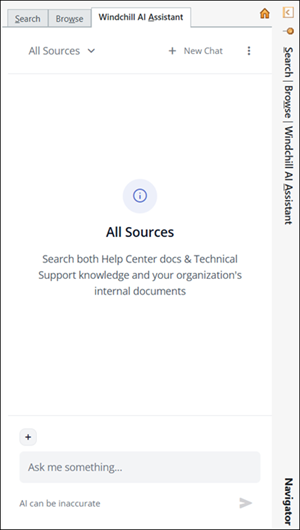
The following table describes the controls on the Windchill AI Assistant tab:
Field | Description | ||
|---|---|---|---|
Source mode | Selects which knowledge sources the Windchill AI Assistant uses to answer your question from the following options: • All Sources • Help/Support Only For more information, see Source Mode. 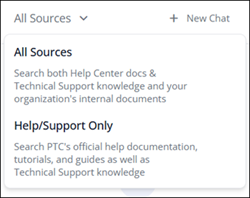 | ||
New chat | Clears the current conversation and starts a new one.  | ||
Option  | Provides access to the Indexing Dashboard. 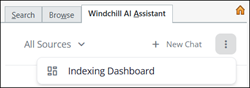
| ||
Container  | Narrows the conversation to a single Windchill context. For more information, see Limit Context by Container (All Sources mode). 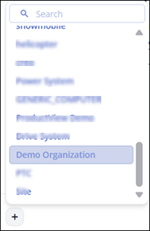 | ||
Input field (Ask me something... or Ask me about PTC eSupport topics...) | Where you type your question or prompt in natural language.   |
Source Mode
Select a mode from the dropdown at the top left of the Windchill AI Assistant tab before you ask a question.
The available modes depend on your license, your AI seat, and your administrator’s configuration.
Mode | What it searches | Use it when | ||
|---|---|---|---|---|
All Sources | Your organization's internal Windchill documents and PTC's official help documentation, tutorials, guides, and Technical Support knowledge. | You want the broadest set of answers, including organization‑specific information from the vault. | ||
Help/Support Only | PTC’s official help documentation, tutorials, guides, and Technical Support knowledge. | You want help using Windchill, troubleshooting an issue, or looking up product guidance. | ||
Windchill Data | Your organization’s internal Windchill documents only. | You want answers strictly from your organization's vault.
|
 | Select New Chat before you switch modes or ask an unrelated question. This gives the assistant a clean context and produces better answers. |
Starting a Conversation
2. Select a source mode from the dropdown at the top of the tab.
3. (Optional) Select a container to narrow the context of your conversation.
4. Enter your question or prompt in the input field.
5. Click  or press Enter.
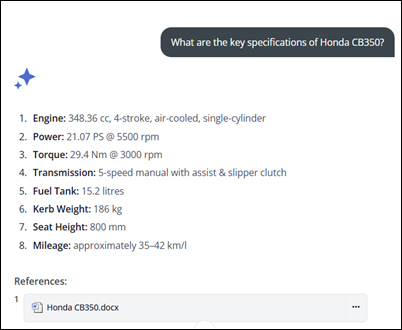
or press Enter.The Windchill AI Assistant returns a natural-language response with citations to the sources it used.
For any vault document referenced in an answer, you must have at least Read and Download permissions. The assistant only uses documents you are authorized to access.
 | • Conversation length is limited. The AI Assistant shows a warning during your last five queries. When the limit is reached, select New Chat to continue. • If a conversation is idle for more than two days, you're prompted to start a new one. • The Windchill AI Assistant supports all languages supported by Windchill. Responses are returned in the language of your question. • The modes and features you see depend on your license, your AI seat, and your administrator's configuration. |
Limit Context by Container (All Sources mode)
In All Sources mode you can restrict the assistant's search to a single Windchill context, or container. Narrowing the scope produces more focused, relevant answers.
1. Click to view the list of available containers.
to view the list of available containers.2. Select a container from the list. The selected container tag appears next to the container control, showing the active context.
To remove a container, click  on its tag. Removing the container broadens the scope of your conversation to include all available containers.
on its tag. Removing the container broadens the scope of your conversation to include all available containers.| | • Only one container can be active at a time. • Selecting a new one replaces the previous selection. • You can limit context only in All Sources mode. It is not available in Help/Support Only or Windchill Data mode. |
Example Prompts
Conversations are not limited to simple fact‑based questions. You can ask complex questions about relationships, procedures, and guidelines to get deeper insights.
Help or support only examples:
• How do I configure recipients in a Data Monitor?
• What are the steps to install the Windchill AI Assistant plugin?
• Why does my workflow task fail with error WTException?
All sources examples:
• Summarize the design specification for Project Alpha.
• Does the "2019 120 Indy" manual include warnings about carbon monoxide exposure?
• What are the service precautions when exposed to carbon monoxide during repair?
• How do I install the adjustable gas can holder on the Switchback?
• How can I create a Data Monitor?
Working with References
Every response by the Windchill AI Assistant includes references to the source used to generate it. References help you verify the accuracy of the response and explore the source content in detail.
You can interact with references in the following ways:
• View reference metadata—Hover over a reference to view its metadata. The metadata displayed depends on the type of reference:
◦ Help center references—The tooltip displays the document type and URL.
◦ Windchill document references—The tooltip displays the document name, version, context, and location.
• Open a Windchill document reference—You can open a Windchill document reference in the following ways:
◦ Select a Windchill document reference to open the document information page in the Windchill main window.
◦ To open the reference in a new tab, click  and then select Open in new tab.
and then select Open in new tab.◦ To download the reference document, click , and then select Download file.
, and then select Download file.• Open a Help Center or Technical Support reference—Select a reference to open it in a new browser tab on PTC eSupport.
◦ Help Center pages open in the language of the conversation when available. If the localized version is not available, the page falls back to English.
◦ Technical Support articles always open in English.
Copying and Rating Responses
You can copy any answer and rate its quality to help improve accuracy over time.
• Select  to copy a response to the clipboard. This is available only for valid responses. It is not available for responses that contain only an error message.
to copy a response to the clipboard. This is available only for valid responses. It is not available for responses that contain only an error message.• Select  or
or  to rate a response.
or to rate a response.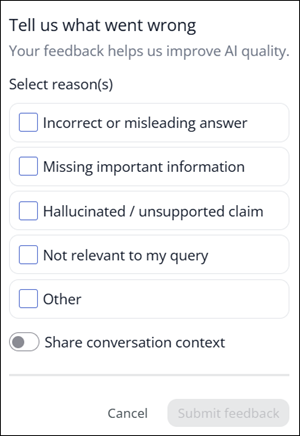
When you rate a response , a feedback form opens.
, a feedback form opens.To submit feedback follow these steps:
1. Under Select reason(s), choose one or more applicable reasons:
◦ Incorrect or misleading answer
◦ Missing important information
◦ Hallucinated / unsupported claim
◦ Not relevant to my query
◦ Other
2. If you choose Other, enter a brief explanation in the What went wrong? field. This field is required.
3. (Optional) Enable Share conversation context to include your conversation for debugging.
4. Select Submit feedback, or click Cancel to discard.
| | When Share conversation context is enabled, the full conversation is logged locally. This includes your questions, AI Assistant responses, document references, and the retrieved content used to generate responses. This information can be shared with PTC to help diagnose and resolve issues. |
Follow‑Up Questions
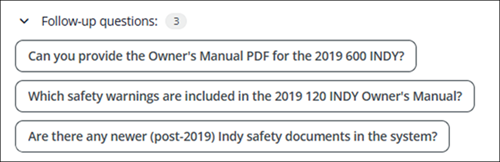
When relevant, the AI Assistant suggests follow‑up questions based on the current conversation.
• Select a suggested question to copy it into the input field.
• Modify the prompt as required, and then submit it.
| | You can refer to documents with contextual terms such as "this" or "the open document." You can also reference a document by name once it appears in the references of the current chat thread. |
Summarizing Documents
Document summarization is available in All Sources mode and uses Windchill vault content. You can summarize a document in two ways.
Follow these steps to summarize a document from the Windchill AI assistant:
• Make sure that All Sources is selected.
• Enter a summarization prompt, such as “Summarize the open document”.
• Click or press Enter.
or press Enter.The Windchill AI assistant generates a summary of the document.
Follow these steps to summarize from the document context menu:
1. Navigate to the document you want to summarize.
2. Right-click the document to open the context menu, and then select Summarize Document.
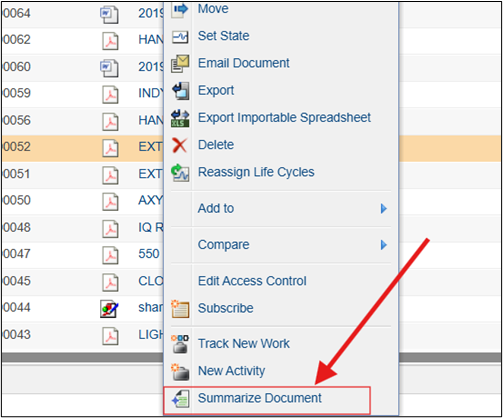
Alternatively, on the document information page, select Summarize Document from the Actions menu.
The summary appears in a pop‑up window.
Troubleshooting Error Messages
In some cases, the AI Assistant may not return an answer, for example, when no accessible source contains the required information, when a conversation limit is reached, or when a request times out. The following table lists the messages you may see, with their cause and recommended action.
Message | Cause | Recommended Action |
|---|---|---|
“I wasn’t able to locate any PTC eSupport Pages or Articles with relevant content I could use to answer your question. Try rephrasing your question, or ask your question in the All Sources mode.” | In Help/Support Only mode, no relevant Help Center or Technical Support content was found, and your account has access to All Sources. | Rephrase your question, or select New Chat and switch to All Sources mode. |
“I wasn’t able to locate any PTC eSupport Pages or Articles with relevant content I could use to answer your question. Try rephrasing your question, or contact your administrator about accessing the All Sources mode.” | In Help/Support Only mode, no relevant content was found, and your account does not have an AI seat for All Sources. | Rephrase your question, or contact your Windchill administrator to request an AI seat. |
“I wasn’t able to locate any documents with relevant content I can use to answer your question. Try rephrasing your question, check whether you have permission to view the documents you need, or contact your administrator.” | In All Sources mode, no accessible vault document contains the required information. | Rephrase your question, verify your permissions, or contact your Windchill administrator. |
“You don’t have access to any AI Assistant functionality at the moment. Talk to your administrator about next steps.” | The user has no AI seat and the administrator has not enabled the Help/Support source. | Contact your Windchill administrator. |
“I wasn’t able to locate any documents with relevant content I can use to answer your question. Try rephrasing your question, check whether you have permission to view the documents you need, or contact your administrator.” | In All Sources mode, no accessible vault document contains the required information. | Rephrase your question, verify your permissions, or contact your administrator. |
“It seems like I can’t chat about this topic. Let’s try a different topic.” | The query cannot be answered because the requested topic violates system or Azure guardrails. | Rephrase your question to ensure it cannot be interpreted as harmful or inappropriate. Avoid providing instructions, and ensure that queries are phrased as questions. |
“Please write in English or in your selected interface language. Other languages aren't supported.” | The query language is neither the Windchill interface language nor English. | If the query language is supported by Windchill, switch the Windchill interface to that language, or resubmit the question in English. |
“The request has timed out. Please contact your administrator.” | The system could not complete processing the request within the allowed time. | Retry later. If the issue persists, contact your Windchill administrator. |
"System Busy - Please Try Again” | The system is experiencing a high volume of requests, either from the current user or collectively from all users accessing the system. | Retry later. Administrators can increase the capacity allocated to the configured model in the Azure AI Foundry portal. |
“The conversation has reached its limit. Please start a new conversation to continue chatting by clicking New Chat.” | The maximum conversation length was reached or the chat is older than two days. | Click New Chat to start a new conversation. |
“It seems like the received response is invalid. Please contact your administrator.” | An unexpected system error occurred while generating the response. | Retry the query. If the error continues, contact your Windchill administrator with details of the issue. |
“Something went wrong, please try starting a new conversation by clicking New Chat.” | This issue can occur due to a variety of reasons. The most common causes are unhealthy or unavailable Azure resources and general network connectivity issues. | Start a new chat by clicking New Chat, and retry. If the error continues, contact your Windchill administrator. |