About AIPartsRationalization_QUEUE
This topic is intended for the Windchill System Administrator.
The AIPartsRationalization_QUEUE queue is automatically created when any parts rationalization indexing job is initiated. To create the queue, the plugin must be installed and configured successfully, and at least one event must occur. It manages, processes, and tracks both real-time and bulk indexing jobs triggered by user actions or system events. This queue ensures that parts are correctly processed and published to the AI plugin for indexing and analysis. This queue ensures that the plugin stays up to date with the latest changes in product data.
Once the plugin is installed and configured, the AIPartsRationalization_QUEUE becomes available under the > section in Windchill. This queue is automatically created out-of-the-box (OOTB) and is always set to the Stop state. This enables it to actively listen to events and be ready to process jobs without requiring manual activation. The AI plugin is responsible for running and managing this queue. The queue is polled at regular intervals, and any available entries are processed.
 |
The queue manages job cleanup based on their status as follows:
• Frequency of cleaning the completed jobs is 1 minute.
• Failed jobs remain in the AIPartsRationalization_QUEUE.
|
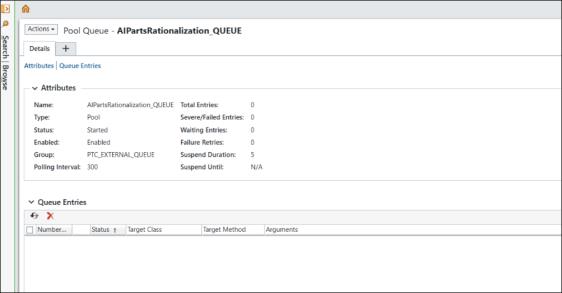
For the AIPartsRationalization_QUEUE, the queue actions such as Start, Stop, Disable, and Edit are not supported.
For more information on Windchill queues, see Working with the Queue Management Utility.