Delivery Target States during Deployments
When a package is deployed to an asset, the state of an asset changes through the deployment. Depending on whether you have deployed a file-based package or an instruction-based package to an asset, the states differ.
 |
These states track the state of an asset through the deployment, and not the overall status of the deployment.
|
The following image depicts the states that a delivery target goes through for the deployment of a file-based package:

The following image depicts the states that a delivery target goes through for the deployment of an instruction-based package:
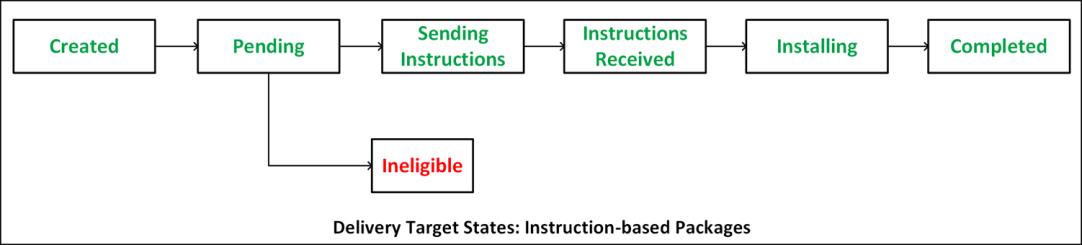
The following table provides information about the delivery target states:
State | Description | ||
|---|---|---|---|
Created | Once the deployment is saved, the state of the target asset is Created. | ||
Pending | SCM regularly searches for deployments that are in the Created state and moves them to the Pending state. It also checks all the assets that are associated with the deployment.
| ||
Ineligible | If the target asset for deployment does not meet the criteria for a package, it goes to the Ineligible state. | ||
Notifying
| If the value of the maxConcurrentUpdates property is not exceeded and the target device can handle more deployments than it is currently processing, the deployment moves from the Pending state to the Notifying state. If the edge device does not respond within a specified time, the deployment moves to the Aborted state. If the notification fails for any other reason, it moves to the Failed state. | ||
Notified
| When the edge device receives a message about the deployment and responds to the server, the state changes to Notified. | ||
Scheduled
| When the server receives the response from the edge device, the state changes to Scheduled. | ||
Downloading
| The state changes to Downloading when the package is being downloaded to the edge device. | ||
Downloaded
| When the package is successfully downloaded to the edge device and is waiting to be installed, the state changes to Downloaded. | ||
Sending Instructions
| When the package instructions are being sent to the asset, the state changes from Pending to Sending Instructions. | ||
Instructions Received
| When the asset receives the instructions and the asset sends a response to the server, the state changes to instructions received. | ||
Installing | When the package is being installed on the asset or edge device, the state changes to Installing. | ||
Completed | When the asset or edge device finishes installing the package successfully, the state changes to Completed.
| ||
Abort Pending | When the asset or edge device is unable to download the package and a time-out is pending, the state changes to Abort Pending. | ||
Cancel Pending | When a user cancels the deployment, the state changes to Cancel Pending. | ||
Failed | When the package is not downloaded to the asset or edge device or if the asset or edge device is unable to install the package, the state changes to Failed. | ||
Aborted | If a time-out occurs during the Notifying or Downloading state, then the state changes to Aborted. | ||
Canceled by User | If the user aborts the deployment, then the state changes to the Canceled by User state. | ||
Pending Retry | This delivery state becomes available only if auto-retry feature is enabled. For more information, see How Auto-Retry Works. | ||
Retrying | This delivery state becomes available only if auto-retry feature is enabled. For more information, see How Auto-Retry Works. |