ThingWorx Remote Access Architectures
ThingWorx Remote Access allows end users to connect to and interact with devices at remote locations. For example, a service technician might need to access an asset at a customer site. Remote access is established through the creation of connections, called "tunnels", to devices and interaction is enabled by a client application for end users. The ThingWorx Remote Access Extension (RAE) and ThingWorx Remote Access Client (RAC) build on and extend existing ThingWorx tunneling capabilities to support remote access servers, including a ThingWorx Internal Remote Access Provider, the Axeda Global Access Server, and the ThingWorx Global Access Server. The following sections describe and illustrate the architecture of ThingWorx Remote Access for previous releases of the following products:
• ThingWorx Platform ("Legacy")
• Axeda Global Access Server, 6.9.2/6.9.3 and ThingWorx Global Access Server, 7.0.x
• ThingWorx Global Access Server, 7.1.0
Legacy Remote Access
Available separately from the extension, the ThingWorx Remote Access Client (RAC) is an application that allows support for any remote access method that the ThingWorx Platform supports, including tunnels for ThingWorx Edge applications, ThingWorx Edge MicroServer, and the Global Access Server (GAS) for Axeda eMessage Agents.
Remote Access has been and still is possible in the following ThingWorx environment:
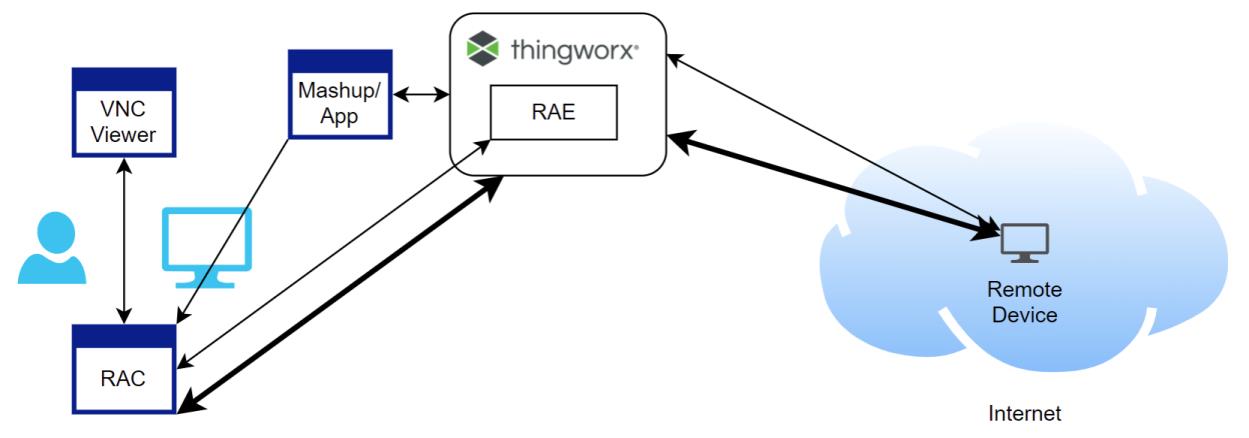
This architecture supports remote access (tunneling) for ThingWorx Edge SDKs and the ThingWorx Edge MicroServer.
Remote Access with Axeda GAS or ThingWorx GAS 7.0.x
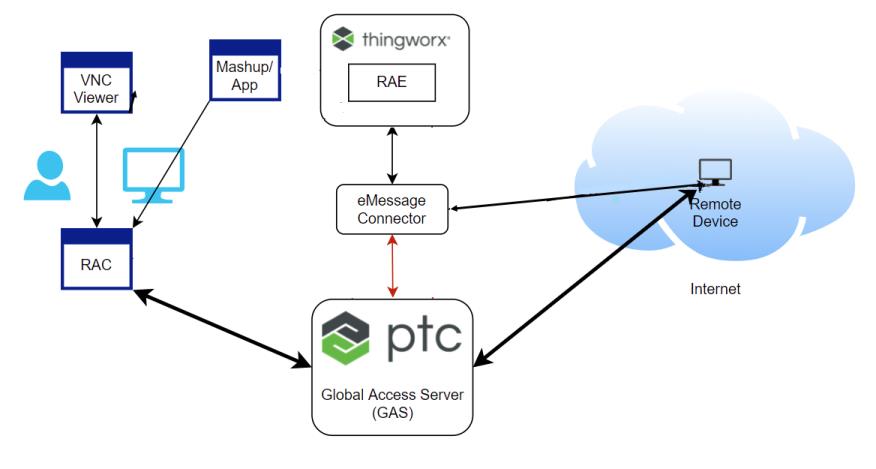
The following diagram illustrates the high-level architecture of remote access in a ThingWorx environment where remote devices running Axeda eMessage agents communicate with the ThingWorx Platform through the eMessage Connector. Users connect to devices for remote sessions through an Axeda GAS 6.9.2 or 6.9.3 or a ThingWorx GAS 7.0.x:
 | The legacy architecture for ThingWorx Edge agents shown in the preceding section is also supported in this environment. |
Remote Access with ThingWorx GAS 7.1.0
The release of ThingWorx GAS 7.1.0 and ThingWorx Remote Access Extension 3.0.0, significantly changes how remote sessions can work with ThingWorx Platform. The feature with these changes is referred to as "GAS Enablement". For details on these changes, refer to GAS (Global Access Server) Enablement.
The following diagram illustrates the new high-level architecture of remote access in ThingWorx environment with ThingWorx GAS, 7.1.0:
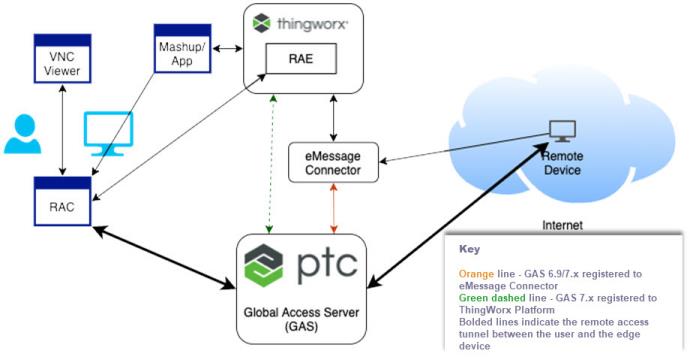
In this architecture connections for remote sessions can be made in the following ways:
• Directly through the ThingWorx Platform, as in the legacy environment shown above. The legacy environment applies to ThingWorx Edge agents such as the ThingWorx Edge MicroServer (EMS) and agents written using a ThingWorx Edge Agent.These agents normally communicate directly with the ThingWorx Platform and do not currently support use of the Global Access Server. Instead, they use the Tunneling Subsystem of the platform.
• Directly through ThingWorx GAS 7.x. Applies to Axeda eMessage Agents, referred to in the GAS installer as the THINGWORX Platform Type.
• Through the eMessage Connector and Axeda GAS 6.9.2/6.9.3 or ThingWorx GAS 7.x. Applies to Axeda eMessage Agents, referred to in the GAS installer as the AXEDA Platform Type.
| | When installing the ThingWorx GAS 7.1.0, you must specify the GAS Server Category, either Standalone (on premises) or Hosted (PTC Cloud Services). In addition, you choose the Platform Type in which GAS will manage remote sessions, either ThingWorx or Axeda. For more information, refer to GAS (Global Access Server) Enablement. |
Remote Access Using the Remote Session Edge Extension (RSEE)
The ThingWorx Remote Session Edge Extension (RSEE) for the ThingWorx Edge C SDK provides remote session capabilities to applications written using the SDK.
The components of remote access in ThingWorx when using the RSEE follow:
• The ThingWorx Platform.
• The ThingWorx Global Access Server, v.7.1.0 or later, registered with the ThingWorx Platform and connected to the platform directly.
• A remote device that is running a remote access server, such as SSH or VNC, and a ThingWorx Edge C SDK application that uses the RSEE.
• The ThingWorx Remote Access Extension (RAE) imported into the ThingWorx Platform to create the RemoteAccess Subsystem as well as all the entities needed for remote access.
• The ThingWorx Remote Access Client (RAC) installed on an end user's machine.
• The client-side application to be used over the remote access connection, also known as a "tunnel". For example an SSH client or VNC Viewer.
The following diagram illustrates the interaction of these components:
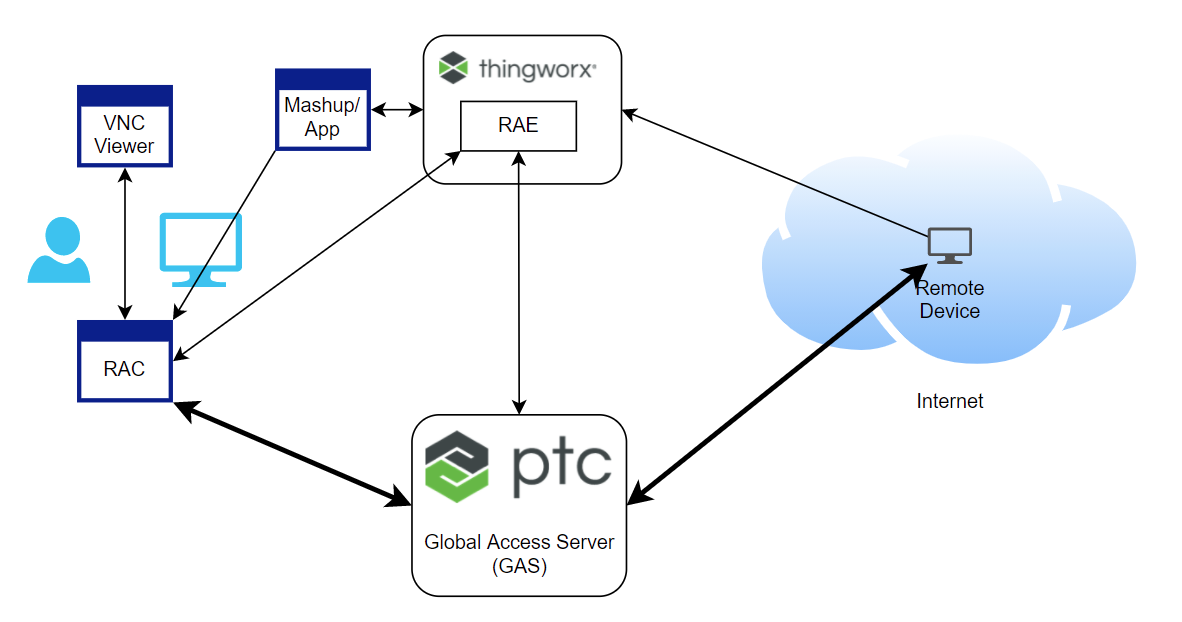
In this diagram, the bold lines indicate the remote access tunnel between the user and the edge device.
The flow of a remote access session using RSEE with the C SDK follows:
1. The user launches a remote session through an application or mashup such as Asset Advisor.
2. The mashup initiates the remote session in ThingWorx:
a. ThingWorx invokes a service on the remote device, indicating it needs to start the remote session and connect to the GAS.
3. The mashup launches the RAC on the user's computer.
4. The RAC creates a persistent connection back to the ThingWorx Platform for messaging and control.
5. The RAC establishes a TCP (persistent) connection to the GAS.
6. The RAC waits in a status polling loop for the GAS to notify the ThingWorx Platform that the remote device has connected and the session has started.
7. The RAC creates a local port and notifies the user to connect their client to the local port.
8. The user launches the client and connects it to the local machine on the provided port.
9. The client sends data over the connection from the RAC through the GAS to the remote device and its remote access server.
10. The remote session is established.