Enabling Lightning Widget for Investigation in Case
The Investigation widget allows Remote Service Engineers (RSEs) to add, view, and manage Observations, Root Causes, and Solutions directly within a Case, providing a centralized interface to capture and track troubleshooting details efficiently. For more information, see Investigations for End Users.
|
Prerequisites
|
|---|
|
Before enabling the Lightning widget for Investigation, verify that the Case has an associated Installed Product. If no Installed Product is identified, the widget cannot be configured, and the following message is displayed: “No matching Installed Product found. Please check IP Source Configuration.”
|
To enable the Lightning widget for Investigation in Case:
1. Open a Case record.
2. Go to Salesforce Setup > Edit Page.
The Lightning App Builder page is displayed.
3. In Search Components, search for ServiceMax Investigation.
4. Drag and drop the Investigation component in the required section.
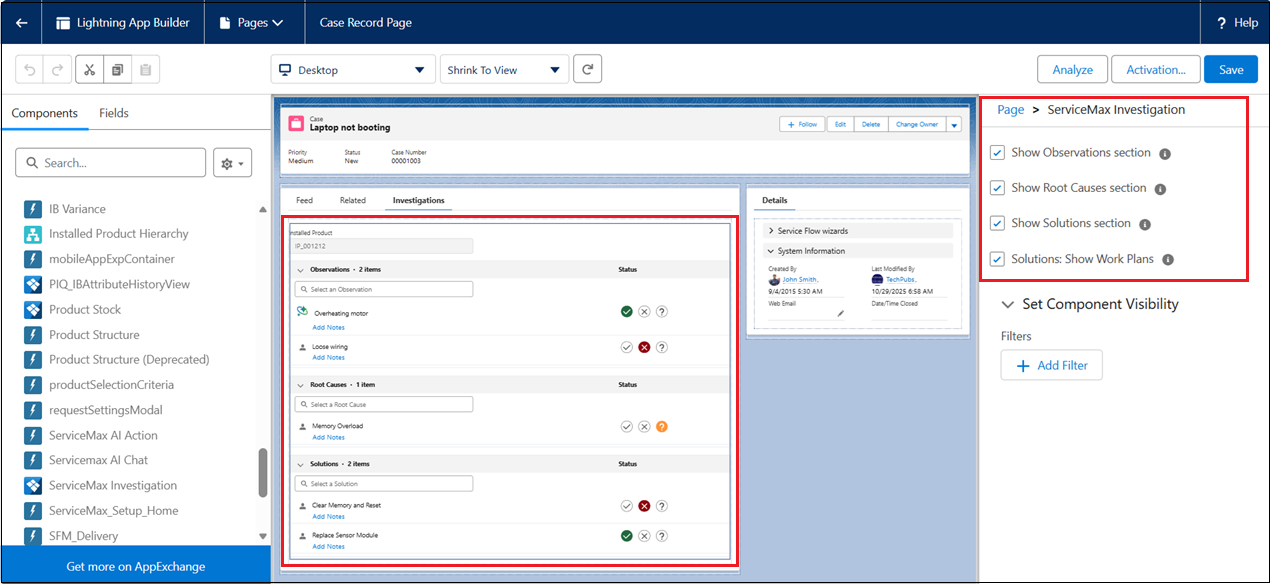
5. Click the added Investigation component to open its configuration panel.
6. Select the required checkboxes in the Page > ServiceMax Investigation section to control which sections appear in the widget.
The following fields determine the visibility of each section:
|
Field
|
Description
|
||
|---|---|---|---|
|
Show Observations section
|
Displays the Observations section in the Investigation component.
|
||
|
Show Root Causes section
|
Displays the Root Causes section in the Investigation component.
|
||
|
Show Solutions section
|
Displays the Solutions section in the Investigation component.
|
||
|
Solutions: Show Work Plans
|
This option is not applicable for Cases.
|
 |
You can also configure the Investigation component as a tab in the Case layout. If you are adding the Lightning component within a custom tab, ensure that the custom tab (for example, Investigation) is created first, and then drag and drop the ServiceMax Investigation component into that tab. For more information, see Adding Lightning Web Component to Product Page.
|