Continuing an Investigation from a Previous Transaction
You can continue an existing Investigation when a Work Order is created from a Case, Service Request, or another Work Order. This allows Remote Service Engineers (RSEs) to leverage existing findings, diagnoses, and solutions, maintain investigation continuity, and ensure a complete service history without duplicating effort.
To continue an investigation from a previous transaction:
1. Locate the required Work Order by searching in the sidebar or selecting it from the Work Orders tab, and then click the Work Order number to open it.
The selected Work Order page is displayed.
2. Select the Investigations tab.
When you open the Investigations tab, the system automatically:
◦ Checks whether the Work Order has a predecessor transaction (Case, Service Request, or Work Order).
◦ Checks whether that predecessor is linked to an Investigation for the same Installed Product.
◦ If multiple predecessor transactions exist, the system uses this priority order to determine which Investigation to display or associate:
▪ Investigation on the current Work Order (if any)
▪ Investigation on the current Case
▪ Investigation on the current Service Request
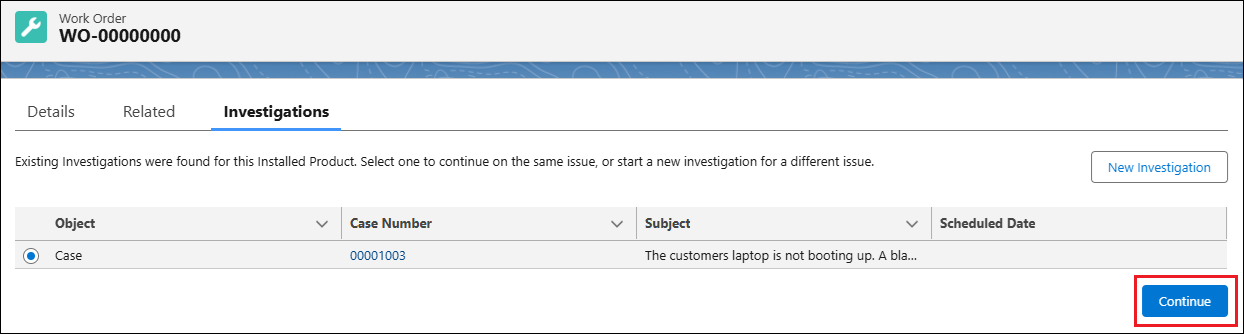
◦ Review the Investigation details. The Investigation list displays information about the transaction where the Investigation originated. The labels vary based on the source type.
|
Source Type
|
Field
|
Description
|
|---|---|---|
|
Case
|
Case Number
|
Identifies the Case linked to the Investigation.
|
|
Subject
|
Summary of the issue reported in the Case.
|
|
|
Scheduled Date
|
Date when the Case was scheduled for follow-up or action.
|
|
|
Work Order
|
Work Order Number
|
Identifies the Work Order linked to the Investigation.
|
|
Description
|
Summary of the work or issue documented in the Work Order.
|
|
|
Scheduled Date
|
Date when the Work Order is scheduled to be executed.
|
|
|
Service Request
|
Request Number
|
Identifies the Service Request linked to the Investigation.
|
|
Subject
|
Summary of the service need reported.
|
|
|
Preferred Start Time
|
Requested or expected start time for service delivery.
|
You can view all associated data and, if needed, add or update dictionary items (Observations, Root Causes, or Solutions).
3. To continue working on the same Investigation, click Continue.
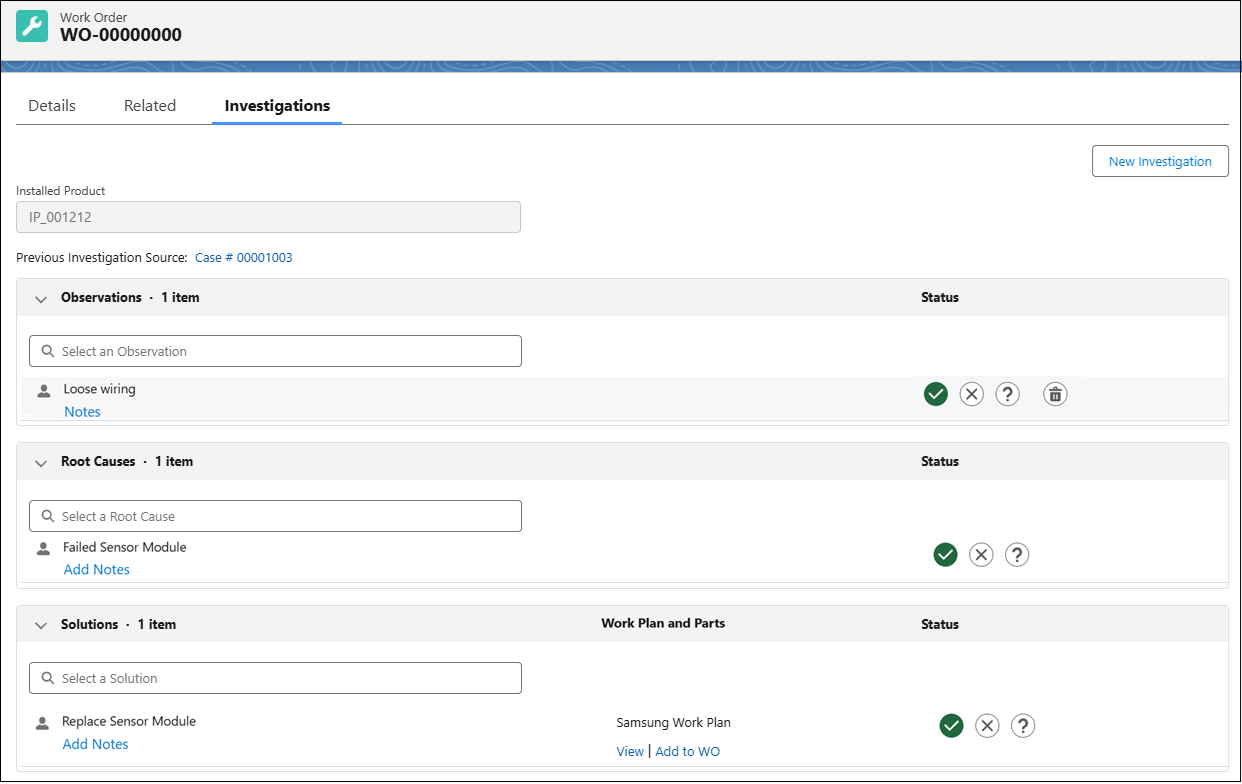
The Investigation opens, displaying all existing Observations, Root Causes, and Solutions linked to the previous record, along with any associated data such as:.
◦ Work Plans linked to Solutions. The associated Work Plan and its parts are carried over, allowing the field engineer to view the Work Plan details and add them to a Work Order directly from the continued Investigation.
◦ Parts added to Solutions that are not linked to a Work Plan. The parts list, including quantities, is carried over and can be managed directly from the continued Investigation. For more information, see Parts Management for Investigation Solutions.
◦ Notes recorded on dictionary items (Observations, Root Causes, or Solutions). All notes from the previous transaction are preserved, allowing the field engineer to review prior findings, decisions, and context without duplicating effort. For more information, see Notes on Dictionary Items.
You can add or modify dictionary items, manage parts, and update notes as needed. This option preserves continuity across linked transactions and avoids creating duplicate Investigations.
 |
The latest items you add appear at the top of their respective sections. If you update the status of an item, it is automatically reordered to the top of the list.
|
4. If the issue is different and must be tracked separately, click New Investigation to start a new Investigation.
The system creates a new Investigation record for the current Work Order and removes its link to the previous Investigation. The earlier Investigation remains associated with its original transaction (for example, Case or Service Request) but is no longer connected to the current Work Order.
|
|
The Continue and New Investigation options are both available when an existing Investigation is found. If you select Continue, you can still choose to start a new Investigation later if needed. However, once you select New Investigation, the action cannot be undone.
|
For more information about managing Investigation data within a Work Order, see Managing Investigation from a Work Order.