Viewing AI Credit Consumption
You can monitor and analyze your AI credit consumption across different platforms and agents such as Asset Service History, Knowledge Access, DataGuide, Troubleshooting Agent, and so on.
To view AI credit consumption:
1. Go to > > .
The ServiceMax AI Console is launched.
2. On the sidebar, select > > .
The ServiceMax AI Analytics page displays with a table showing credit usage data for different platforms and agents.
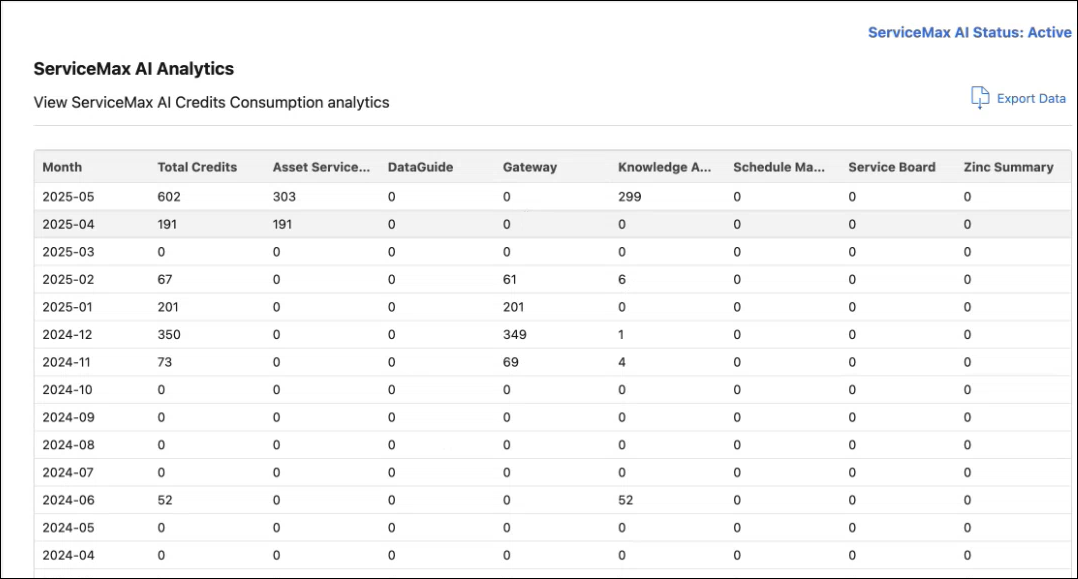
The AI Credits Consumption table includes the following fields:
|
Field
|
Description
|
|---|---|
|
Month
|
Calendar month during which AI credits were consumed.
|
|
Total Credits
|
Total number of AI credits used in the month.
|
|
Export Data
|
Button to download credit consumption data as a CSV file for offline analysis.
|