Viewing Zinc AI Knowledge Articles in Knowledge Access Agent
Zinc AI knowledge saved from hotline conversations is automatically uploaded to the Knowledge Access agent, so the agent can answer questions using the same guidance shared in hotline interactions, when a hotline staff capture subject-matter expertise in Zinc and save it as an AI knowledge article.
This feature is for hotline staffers who create and update Zinc AI knowledge articles and AI administrators who manage the Knowledge Access document set. It reduces duplicate documentation and keeps Knowledge Access up to date as articles change.
The Zinc AI knowledge article is available as a document in the Knowledge Access agent’s document list, and subsequent saves update the same document so that the Knowledge Access uses the latest content.
|
Prerequisites
|
|---|
|
To enable this feature, ensure the following:
• Your Zinc org is entitled for ServiceMax AI.
• Your Zinc account is linked to the appropriate Salesforce org/account.
• Knowledge Access is enabled for the org and you can access it in the AI Console.
|
To view a Zinc AI knowledge article uploaded in Knowledge Access:
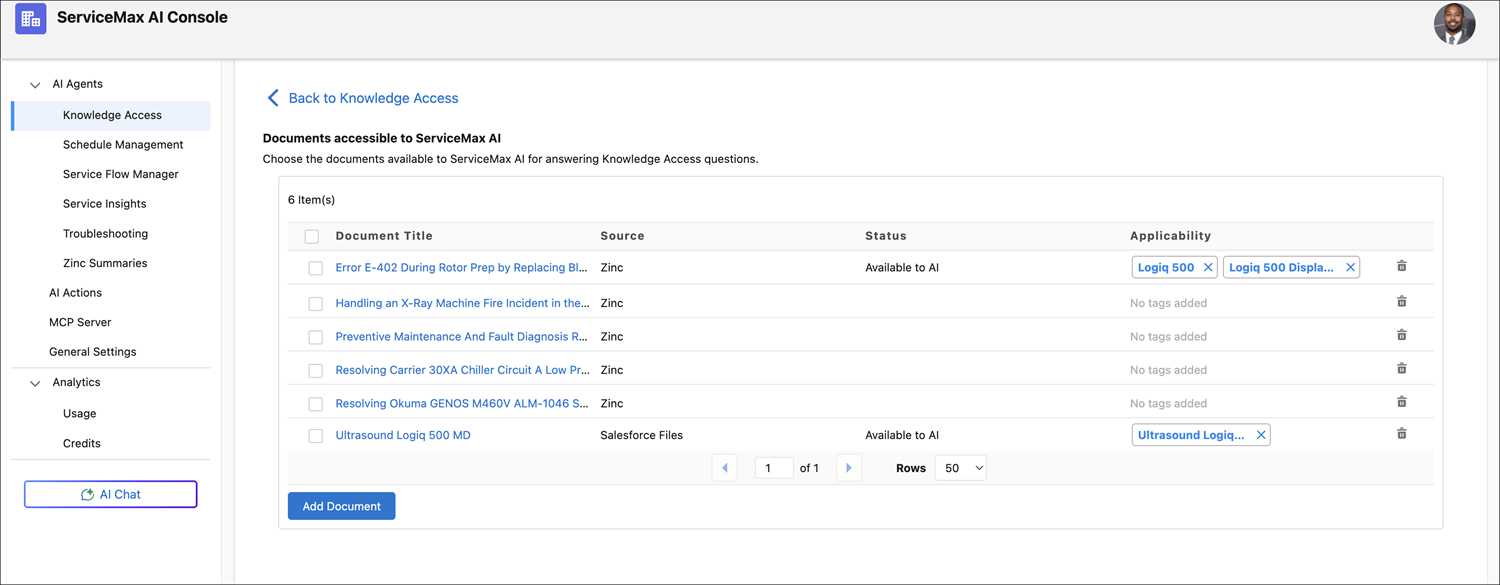
1. In the AI Console, go to Knowledge Access > Manage Documents.
The list of documents accessible to ServiceMax AI is displayed. For Zinc AI knowledge articles, the Source is specified as Zinc.
2. Click the Document Title to review the document.
 |
After Zinc uploads an article, it may appear as Pending Applicability in Knowledge Access. An administrator must add applicability tags in the AI Console before the Knowledge Access agent can use it to answer questions. If the article is saved again in Zinc, Knowledge Access updates the same document. Articles without applicability tags are stored, but the agent does not use them. For more information, see Adding Applicability Tags to Documents.
|