Configuring Service Flow Automation Settings
To enable Service Flow Automation (SFA) to execute AI actions automatically, configure authentication parameters that support secure, token-based communication with Salesforce APIs.
|
Prerequisites
|
|---|
|
To enable this feature, ensure the following:
• Read access to the AI Config data object and AI Action Event. For more information, see Providing Access and Permissions.
• Complete the configurations for the self-signed digital certificate, connected app, and connected app permissions. For more information, see Prerequisites for Push and SMS Notification.
|
To configure SFA in the AI Console, perform the following steps.
1. Navigate to > > .
The ServiceMax AI Console is launched.
2. On the sidebar, select > .
The Manage ServiceMax AI page is displayed.
3. Click Edit Configuration.
The Configure SFA Settings window is displayed.
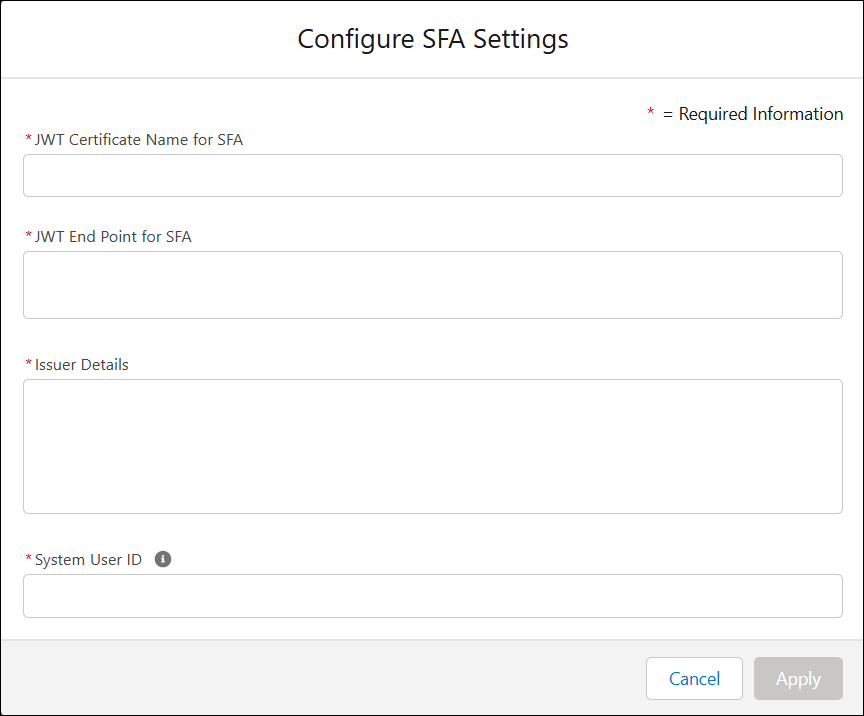
4. Provide the details for the fields as described in the following table.
|
Field
|
Description
|
|---|---|
|
Fields marked with * are mandatory.
|
|
|
JWT Certificate Name for SFA*
|
Name of the certificate created during JWT setup. Used for secure authentication. For more information, see Create Self Signed Digital Certificate.For example: SFA_PN
|
|
JWT End Point for SFA*
|
Domain URL of your Salesforce org for token-based authentication.
For example:
• https://test.salesforce.com/services/oauth2/token
• https://login.salesforce.com/services/oauth2/token
• Any custom Salesforce domain.
|
|
Issuer Details *
|
Consumer Key from the connected app under Manage Consumer Details. Identifies the app making the request.
C = USAS = CAL = San FranciscoO = Salesforce.comOU = 00Dao00001Q5WfnCN = SFA
|
|
System User ID*
|
Salesforce User ID used for license-level authentication. This user executes the automated actions.For example, 005ao000008ZzkPAAS
|
5. Click Apply to save the settings.
SFA is now configured to run Automated AI actions in both the Salesforce web and Go applications.