Event flag (dictionary item)

For automation interface information about an Event Flag, click here Event flag (automation interface).
An Event Flag indicates that a given event has happened. It is used when tasks need to communicate but not necessarily synchronize. The standard operations associated with an event flag group are:
• Set
• Clear
• Read
You can create an Event Flag through the context menu of a Package: right-click the Package, and select > > > . In addition, you can create an Event Flag through a Concurrency Diagram.
When used on a diagram, an Event Flag's notation is as follows:
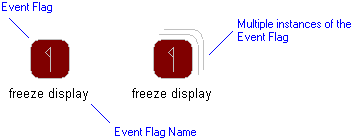
In the Modeler panes, a short-cut symbol  on the Event Flag's icon indicates that the item is a stub.
on the Event Flag's icon indicates that the item is a stub.The following sections provide information about how an Event Flag is used in the model. For more information about a property, item, model part or diagram, click it.
Properties
In addition to the standard properties, an Event Flag has these properties:
 | The Class box on the Options tab of a Event Flag's Property Pages shows the Class, Data Type or Interface that owns the Operations that implement the Event Flag. |
Owned by
 Model
Model Package
Owns
 Comment
 Constraint
 Dependency — The Dependency is owned jointly by the Event Flag and the other associated item. The access permissions you have to a Dependency are determined by the access permissions of the dependent item.
Defined in these parts of the model
 Concurrency Model
Shown on these diagrams
 Concurrency Diagram
 Variant Diagram
Can be linked to these dictionary items
 Class — The linked Class contains the Operations required to implement the Event Flag (drag Class to Event Flag symbol on diagram).
 Data Type — The linked Data Type contains the Operations required to implement the Event Flag (drag Data Type to Event Flag symbol on diagram).
 Interface — The linked Interface contains the Operations required to implement the Event Flag (drag Interface to Event Flag symbol on diagram).
 Stereotype
| | Like most other items in a Model, an Event Flag can be linked to an Activity Partition, Comment, Frame Box, General Node, General Flow, General Flow Diagram Node, Constraint (applied), General Flow Diagram Flow or Swimlane. |