Editing, Moving, or Resizing Plot Legend
Editing the Plot Legend
• You can edit the plot legend text font using the Text Formatting tab.
• When you remove the legend and then toggle it back, the format and location defined previously are restored.
Moving the Plot Legend
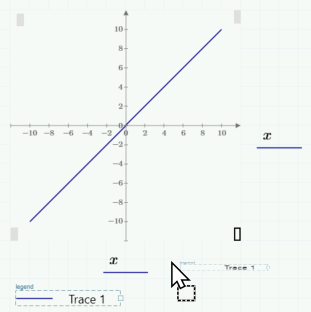
You can move the plot legend of XY plots. To move the legend, click and drag it to one of the specified locations. As you drag the legend, possible locations are indicated by gray rectangles. Release the mouse after the rectangle of the new location has turned black. The plot legend adjusts to fit the new position.
Possible locations for the plot legend:
Resizing the Plot Legend
• To resize the plot legend, move the pointer over the right border until it changes to  . Click and drag the pointer horizontally until the plot legend is positioned as desired.
. Click and drag the pointer horizontally until the plot legend is positioned as desired.• The legend traces can be organized into one, two, or three columns.