Configuring the Central Auth Server
The Central Auth Server (CAS) manages the trust relationship between PTC products participating in the SSO framework. The CAS acts as a broker between applications by authorizing user logins, once the user has been authenticated, and by issuing and verifying access tokens that are exchanged between service providers and resource servers.
The following are some general tips you should consider when deploying a CAS:
• Review the maximum time that a user login session is valid and consider if the same values should be used in each of the applications participating in your SSO solution.
• Confirm that systems are working within an acceptable time skew tolerance. If one or more system clocks are out of sync with the CAS, and it exceeds the skew tolerance time set in the systems, then the configuration will throw errors and prevent users from being authenticated.
PTC SSO-enabled products implement the following two authentication flows using the SSO framework and standard protocols:
• Federated Authentication
• Authorization - Delegated Authorization using OAuth grant types
Federated Authentication
Federated authentication is the process of validating a user’s login request by comparing it with the credentials stored in the identity provider.
In the PTC product SSO architecture, the Central Auth Server (CAS) should be configured to redirect user login requests to your enterprise IdP. The IdP verifies the authenticity of the user login credentials and creates an assertion that the user has been authenticated. Authentication is implemented using either SAML or OIDC, depending on the supported protocol for the PTC product (see Supported SSO Protocols for PTC Products) and customer configuration.
Once authentication is confirmed, the assertion is sent to the requesting application indicating that the user has been successfully authenticated and authorizes the user login. Throughout this transaction, neither the CAS nor the PTC application will have the visibility or will manage the user credentials. When the browser is redirected to the IdP, the exchange of username and password information occurs directly between the user client agent (browser) and the IdP. You must create a separate Service Provider (SP) connection for each PTC product that is in the same federation relying on user authentication through the same CAS.
Standard SAML and OIDC authentication flows will be followed, based on the SSO configuration. Supported options for a particular CAS technology should be reviewed prior to selecting it for use in a PTC SSO configuration.
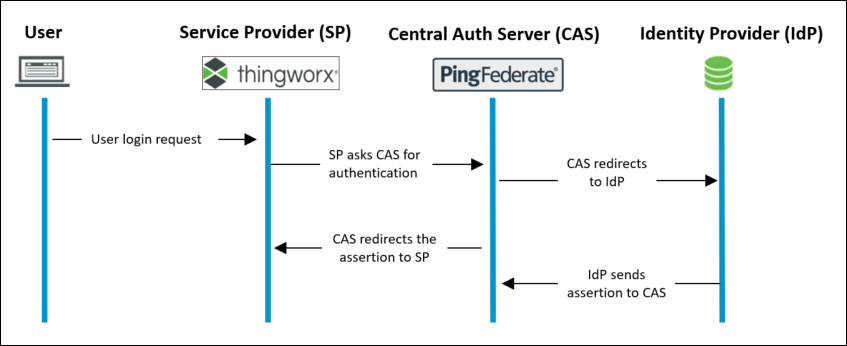
In the following sequence diagram, the authentication flow is depicted. In this example, ThingWorx is acting as the SP and PingFederate is the CAS. ThingWorx uses the open standard SAML 2.0 protocol for authentication exchange between the SP and IdP.
The authentication process is as follows:
1. The user attempts to access the service provider.
2. The service provider generates a SAML request for the user and sends the request to the CAS.
3. The CAS redirects the SAML request to the IdP.
4. The IdP redirects the user to an authentication page to provide their credentials (e.g. user name and password). Once the user has entered their credentials, the IdP generates a SAML response. If the user is successfully authenticated, the SAML Response will include a SAML Assertion which contains the user’s authorization.
5. The IdP then redirects the response to the CAS.
For PingFederate, PTC provides automation scripts for configuration with PingFederate as the IdP. For more information, see Configuring PingFederate as the Central Auth Server automatically.
For third-party IdPs, you must configure your CAS in the SSO setup.
Delegated Authorization (OAuth)
Delegated authorization is a concept that allows a Service Provider (SP) to take actions or access resources from a Resource Server (RS) on behalf of a user, without the user sharing their credentials with the RS.
OAuth 2 access tokens are requested from the CAS that are then used in requests for data from resource servers. Resource servers rely on the CAS to verify the requestor as an authenticated user before allocating the access tokens. You need to create separate OAuth clients for each of the PTC applications participating in delegated authorization scenarios.
PTC products further protect resources that are protected by OAuth by configuring scopes as an additional protective measure. When a service provider sends an access token along with its request for data from the resource server, the access token must also have a scope attached that is registered against the data in the resource server. For more information, see Managing Scopes in Delegated Authorization.
PTC products support OAuth grant types for both interactive and non-interactive clients. It is important to understand the client functionality to determine the appropriate grant type to be used.
 |
Make sure you check the specific PTC product documentation to confirm the supported OAuth grant types for your product.
|
◦ Interactive: User authenticates to the client, the client will request resources on behalf of that same user; authorization to allow access to the resource is based on the end-user authorization.
◦ Non-Interactive: Also known as Machine-to-Machine (M2M) interaction. The client is an application and must identify itself to the CAS when requesting an OAuth token. The identity in the OAuth token is the machine identity (client or service principal) and not intended to be a human user.
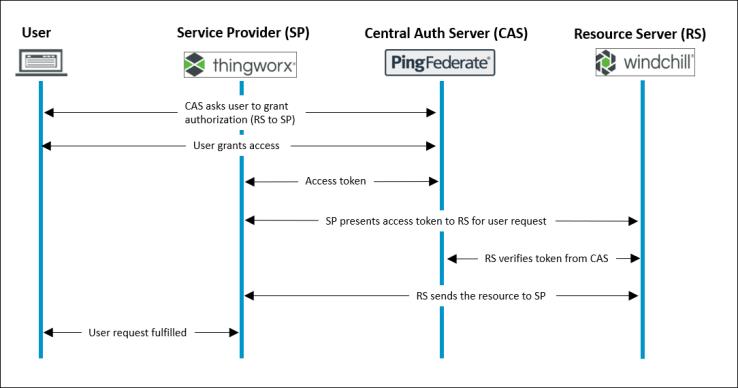
In the following sequence diagram, the OAuth authorization code flow is depicted. ThingWorx is the SP, PingFederate is the CAS, and Windchill is the RS. ThingWorx in an interactive client configured to use the open standard OAuth2 protocol authorization code flow to authorize an SP to access resources in a secure, reliable, and efficient manner, using the user ID of the end user for authorization to retrieve the resource.
The authorization process is as follows:
1. After receiving the SAML response from the IdP, the CAS sends a grant authorization request page for the user to approve. The CAS uses the grant authorization request page to get authorization to generate an OAuth code.
2. After the user grants access, the CAS generates an OAuth authorization code. The CAS then redirects the SAML response and authorization code to the service provider.
3. Once the service provider receives the OAuth authorization code, it requests an access token and refresh token from the CAS, using the authorization code.
4. The CAS validates the authorization code and generates an OAuth access token and refresh token. The CAS then sends both tokens to the service provider.
5. The resource owner (typically the user) requests content from the service provider that requires data from the resource server.
6. The service provider requests content from the resource server on behalf of the resource owner using the access token.
7. The resource server verifies the access token with the CAS.
8. The resource server then obtains the requested content and sends it to the service provider.
9. After receiving the content, the service provider delivers it to the resource owner.
Alternate CAS technologies can be configured using this same flow; specific configuration steps and settings may need to be considered.
In the non-interactive case, the Client Credentials flow is used to pass a client ID and secret to the CAS to retrieve an OAuth token. The OAuth token is then passed to the RS to retrieve the requested resource. The RS must be configured to support the Client Credentials grant type to be able to manage the OAuth token and validate the request. In the following sequence diagram, the Client Credentials flow is depicted with a non-interactive client requesting a resource from Windchill as the RS.
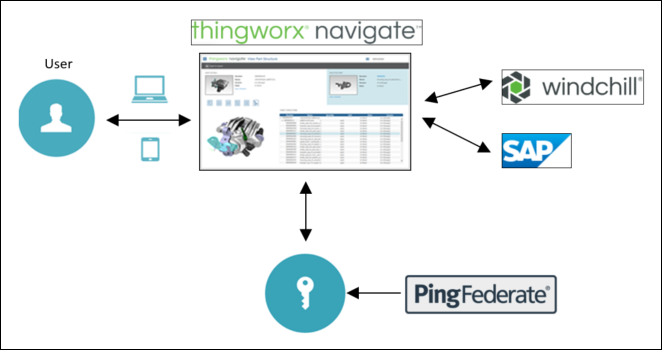
You can also configure the SSO architecture as a federation with multiple service providers and multiple resource servers. The SP and RS configurations are managed by a single CAS. This way all user identities are shared among the federation. In the following example, Windchill Navigate is the service provider and Windchill and SAP are the resource servers.