The Cutline Milling Element Tree
This section describes how to construct and access the element tree for a cutline milling sequence. It also describes how to create, redefine, and access the properties of these features.
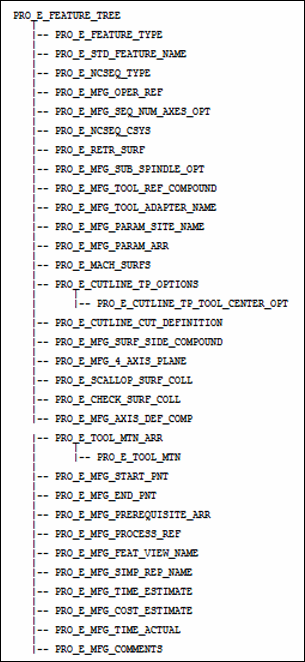
The element tree for the cutline milling sequence is documented in the header file ProMfgFeatCutlineMilling.h, and is as shown in the following figure:
Figure 170. Element Tree for Cutline Milling feature
Element ID | Data Type | Description | ||
|---|---|---|---|---|
PRO_E_FEATURE_TYPE | PRO_VALUE_TYPE_INT | Mandatory element. Specifies the type of the feature. The valid value for this element is PRO_FEAT_MILL. | ||
PRO_E_STD_FEATURE_NAME | PRO_VALUE_TYPE_WSTRING | Optional element. Specifies the name for the Creo NC sequence. The default value is Cutline_Milling_1. | ||
PRO_E_NCSEQ_TYPE | PRO_VALUE_TYPE_INT | Mandatory element. Specifies the type of Creo NC sequence. The valid value for this element is PRO_NCSEQ_CUTLINE_MILL. | ||
PRO_E_MFG_OPER_REF | PRO_VALUE_TYPE_SELECTION | Mandatory element. Specifies the operation feature selection. | ||
PRO_E_MFG_SEQ_NUM_AXES_OPT | PRO_VALUE_TYPE_INT | Specifies the number of controlled axes. The valid values for this element are: • 3—Default value. • 4 —Used for machining with tool axis parallel to the plane specified in PRO_E_MFG_4_AXIS_PLANE. This is applicable if work center allows 4-axis, or 5-axis machining. • 5—Used for 5-axis machining. This is applicable if work center allows 5-axis machining. | ||
PRO_E_NCSEQ_CSYS | PRO_VALUE_TYPE_SELECTION | Mandatory element. Specifies the datum coordinate system that will be used as the coordinate system for the Creo NC sequence. | ||
PRO_E_RETR_SURF | Compound | Mandatory compound element. Specifies retract compound definition. For more information, refer to the section Retract Elements. | ||
PRO_E_MFG_SUB_SPINDLE_OPT | PRO_VALUE_TYPE_INT | Optional Element. Specifies the type of spindle assigned to the sequence. This element can be used when two parts are machined during the same operation in different spindles, that is in the main spindle and in the sub spindle. The valid values for this element are defined by the enumerated type ProSubSpindleOpt. For more information on the values of ProSubSpindleOpt, refer to the section Spindle Types. | ||
PRO_E_MFG_TOOL_REF_COMPOUND | Compound | Mandatory compound element. Specifies tool reference compound definition. For more information, refer to the section Tool Reference. | ||
PRO_E_MFG_TOOL_ADAPTER_NAME | PRO_VALUE_TYPE_WSTRING | Optional element. Specifies the tool adapter model name. | ||
PRO_E_MFG_PARAM_SITE_NAME | PRO_VALUE_TYPE_WSTRING | Optional element. Specifies the name of the site file with default values for manufacturing parameters.
| ||
PRO_E_MFG_PARAM_ARR | Array | Mandatory element. Defines an array of manufacturing parameters. For more information, refer to the section Manufacturing Parameters. | ||
PRO_E_MACH_SURFS | Compound | Mandatory compound element. Specifies the machining surfaces compound definition. For more information, refer to the section Element Trees: Machining Surfaces. | ||
PRO_E_CUTLINE_TP_OPTIONS | Compound | Optional element. Specifies tool path options. | ||
PRO_E_CUTLINE_TP_TOOL_CENTER_OPT | PRO_VALUE_TYPE_INT | Optional element. Specifies the tool center curve option. | ||
PRO_E_CUTLINE_CUT_DEFINITION | Compound | Mandatory element. Specifies the cutline array compound definition. For more information on the sub elements, For more information, refer to the section Element Tree for PRO_E_CUTLINE_CUT_DEFINITION. | ||
PRO_E_MFG_SURF_SIDE_COMPOUND | Compound | Optional element. Specifies the surface side definition. For more information, refer to the section Manufacturing Surface Side. | ||
PRO_E_MFG_4_AXIS_PLANE | PRO_VALUE_TYPE_SELECTION | Specifies the selection of datum plane or planar surface.
| ||
PRO_E_SCALLOP_SURF_COLL | Compound | Optional element. Specifies the scallop surfaces compound definition. | ||
PRO_E_CHECK_SURF_COLL | PRO_VALUE_TYPE_SELECTION | Optional element. Specifies the check surfaces collection. For more information, refer to the section Checking Surfaces. | ||
PRO_E_MFG_AXIS_DEF_COMP | Compound | Optional element. Specifies the compound element for the axis definition. | ||
PRO_E_TOOL_MTN_ARR | Array | Optional element. Specifies an array of tool motions. | ||
PRO_E_TOOL_MTN | Compound | Optional element. Specifies the tool motion compound specifications. The applicable tool motion types for this element are : • PRO_TM_TYPE_CUTLINE_MILLING. For more information, refer to the section The Cutline Milling Element Tree. • PRO_TM_TYPE_TANGENT_APPROACH. For more information, refer to the section Tool Motion — Tangent Approach. • PRO_TM_TYPE_NORMAL_APPROACH. For more information, refer to the section Tool Motion — Normal Approach. • PRO_TM_TYPE_HELICAL_APPROACH. For more information, refer to the section Tool Motion — Helical Approach. • PRO_TM_TYPE_RAMP_APPROACH. For more information, refer to the section Tool Motion — Ramp Approach. The applicable tool motion types for 4 and 5-axis machining are: • PRO_TM_TYPE_ALONG_AXIS_APPROACH. For more information, refer to the section Approach Along Tool Axis. | ||
PRO_E_MFG_START_PNT | PRO_VALUE_TYPE_SELECTION | Optional element. Specifies the datum point selection. It allows to start the machining at the specified position. | ||
PRO_E_MFG_END_PNT | PRO_VALUE_TYPE_SELECTION | Optional element. Specifies the datum point selection. It allows to end the machining at the specified position. | ||
PRO_E_MFG_PREREQUISITE_ARR | Array | Optional element. This array specifies the Ids of the prerequisite sequences. For more information, refer to the section Sequence Prerequisites. | ||
PRO_E_MFG_PROCESS_REF | PRO_VALUE_TYPE_SELECTION | Optional element. Specifies the reference selections such as part, feature, curve, surface, datum plane, axis, point, and datum coordinate. It allows you to create additional geometric references to be used only in special process application. This element supports multiple selections. | ||
PRO_E_MFG_FEAT_VIEW_NAME | PRO_VALUE_TYPE_WSTRING | Optional element. Specifies the name of the view. This element allows you to associate a specific view with the machining step.
| ||
PRO_E_MFG_SIMP_REP_NAME | PRO_VALUE_TYPE_WSTRING | Optional element. Specifies the simplified representation name. This element allows you to associate the specific simplified representation with the machining step.
| ||
PRO_E_MFG_TIME_ESTIMATE | PRO_VALUE_TYPE_DOUBLE | Optional element. Specifies the time estimated for the machining step.
| ||
PRO_E_MFG_COST_ESTIMATE | PRO_VALUE_TYPE_DOUBLE | Optional element. Specifies the cost estimate for the machining step.
| ||
PRO_E_MFG_TIME_ACTUAL | PRO_VALUE_TYPE_DOUBLE | Optional element. Specifies the actual time for the machining step.
| ||
PRO_E_MFG_COMMENTS | PRO_VALUE_TYPE_WSTRING | Specifies the sequence comments. |