![[Integration Kit Contents]](../../icons/Nav01_Home.png "Integration Kit Contents")
![[Integration Kit What's New]](../Nav02_WhatsNew.png "Integration Kit What's New")
![[Integration Kit Function Index]](../../icons/Nav03_Index.png "Integration Kit Function Index")
![[More Documentation]](../../icons/Nav04_Advanced.png "More Documentation")
![[PTC]](../../icons/logo.png "Visit PTC.Com")
| |
|


Default settings in Creo Elements/Direct Modeling are presented to the user by means of the Default Settings Browser which can be accessed from the File -> Settings menu.
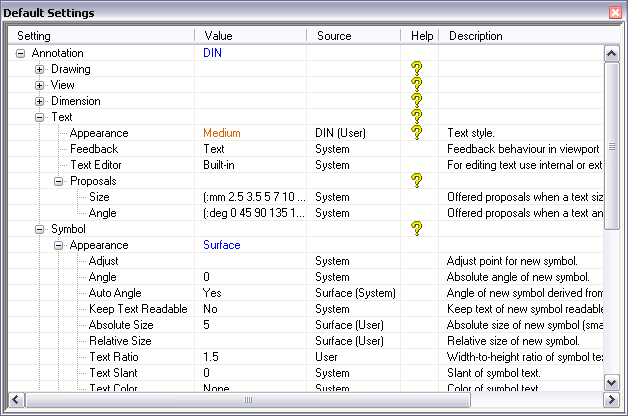
Each setting is uniquely identified by a path (a string separated with "/" characters) which makes up the tree displayed in the left-most column (header: Setting) of the Default Settings Browser. Each path portion is presented by a localized string, but internally the path is unique across all languages. Branches of the tree can be opened and closed by clicking on the + and - signs in front of parent nodes.
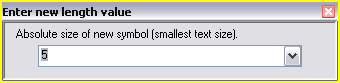 Each
setting (leaf of tree) has a definite value type or definite range of
possible values. The current value of a setting is displayed in the
Value column. If you do a double-click on a value cell of a setting,
a little input tool pops up which allows you to modify the current default
value. The title of that tool describes what type of value is expected. The
label above the input field repeats the description of the setting. A setting may offer a
list of proposals which can be accessed from the little down-arrow to
the right of the input field. The new setting value is only accepted if it
fits to the value type of the setting or if it is a member of a given range.
In addition an optional check-function may reject a value too.
Each
setting (leaf of tree) has a definite value type or definite range of
possible values. The current value of a setting is displayed in the
Value column. If you do a double-click on a value cell of a setting,
a little input tool pops up which allows you to modify the current default
value. The title of that tool describes what type of value is expected. The
label above the input field repeats the description of the setting. A setting may offer a
list of proposals which can be accessed from the little down-arrow to
the right of the input field. The new setting value is only accepted if it
fits to the value type of the setting or if it is a member of a given range.
In addition an optional check-function may reject a value too.
The string displayed in the Source column tells you the source of where the current value comes from. This could be a single level string like System, Corp, Site or User, or a combination of a style name and a level in parenthesis. If the current value of a setting is still the system default, the source level is set to System. If you as the user modified a default setting, its source will change to User or a combination of Style-Name and User. For more information about styles and how to define setting values by Corp or Site, please continue reading.
An optional question mark icon in the Help column indicates that there exists additional help for a specific setting or a group of settings (question mark at a parent node). Click this icon to display more detailed information.
A one-line short description is given in the right-most column of the Default Settings Browser. This information gives you a little more information about what the setting is good for.
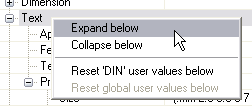 If you right-click on an item or off an item you'll
see a context menu with useful commands. On a parent node item you
can expand or collapse this and all other child nodes with one click. If you
modified one or more setting values below the selected parent node, one or
both Reset ... values below commands become accessible depending on
where you stored the value to. With this you can easily reset your
modifications back to system, corp or site values. This functionality is
also available on single settings.
If you right-click on an item or off an item you'll
see a context menu with useful commands. On a parent node item you
can expand or collapse this and all other child nodes with one click. If you
modified one or more setting values below the selected parent node, one or
both Reset ... values below commands become accessible depending on
where you stored the value to. With this you can easily reset your
modifications back to system, corp or site values. This functionality is
also available on single settings.
The right-click commands offered in the menu when clicked off an item
(area below all rows or to the left of an item) work on all settings. Here
the full settings tree can be expanded or collapsed and also all user values
can be restored to system, corp or site values.
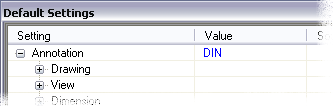 The style concept allows the user (or site, corp or
system) to assign certain setting values to a style to easily switch a set
of setting values from one style to another. Styles can basically exist on
any parent node of the settings tree, but you can only create additional
styles on nodes where styles already exist or you can create additional
reference styles.
The style concept allows the user (or site, corp or
system) to assign certain setting values to a style to easily switch a set
of setting values from one style to another. Styles can basically exist on
any parent node of the settings tree, but you can only create additional
styles on nodes where styles already exist or you can create additional
reference styles.
If a style is active, its name is shown in blue
color in the Value cell of a parent node. If no style is
available, the value cell remains blank. If one or more styles exist for a
parent node but no style is active, three dots "..." are shown in
the value cell. Some nodes like the Annotation root node don't allow
to switch off the style and therefore you'll see a blue style name in that
value cell all the time.
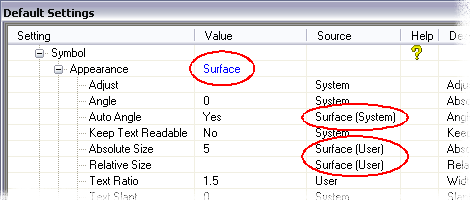 If the current value of a setting is determined by
a style, the source cell of that setting shows the name of the style plus
the level on which the style value was defined on (System, Corp, Site,
User).
If the current value of a setting is determined by
a style, the source cell of that setting shows the name of the style plus
the level on which the style value was defined on (System, Corp, Site,
User).
If you change a setting value interactively at runtime the new value will be assigned automatically to the next active style along the path from the setting leaf to the root of the settings tree. If no style is active up to the root, the value is stored as User value. A user value always remains active no matter which style(s) are active on the path up to the root. Those values are also called Global User Values. For more information about user and style values, please see below.
This default assignment can manually be overwritten if you click the source cell of the setting whose value you just changed. The in-place drop down list allows you to change the value assignment to User (Global user value) or any other style which is active. That way you can have different setting values depending on which style is active at a parent node. The drop-down list also contains a command to reset the current user value. With this another defined site, corp or system value will be restored as setting value.
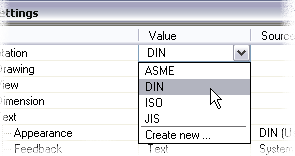 To switch off the current style (if possible)
or to switch to another style or to create a new additional style, click the
value cell of a parent node with already defined styles and an in-place
range selection UI appears. Here you see which styles are defined on that
node. Choose another style and settings which have a value defined in that
new style will update their current value and settings which had a value in
the previous style defined will determine a new value based on the new
active style(s).
To switch off the current style (if possible)
or to switch to another style or to create a new additional style, click the
value cell of a parent node with already defined styles and an in-place
range selection UI appears. Here you see which styles are defined on that
node. Choose another style and settings which have a value defined in that
new style will update their current value and settings which had a value in
the previous style defined will determine a new value based on the new
active style(s).
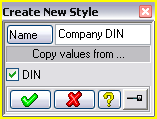
 If
you choose Create new ... from the drop-down list a dialog to create
a new style on that node appears. By default the check mark to copy all
style values from the previously active style on that node to the new style
is set. That way you can create a variation of the style without the need to
modify the original style.
If
you choose Create new ... from the drop-down list a dialog to create
a new style on that node appears. By default the check mark to copy all
style values from the previously active style on that node to the new style
is set. That way you can create a variation of the style without the need to
modify the original style.
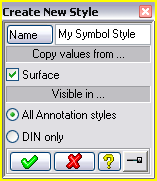
On other than root nodes you can determine if the new style should be
visible/accessible all the time or whether its visibility depends on which
style is currently active at the root node of the parent node (node for
which you create a new style).
In the example to the left, the currently active style at the root node
("Annotation") is DIN. Therefore you can tell the new style
My Symbol Style to be accessible only if the root style is DIN or all
the time. That way you can avoid huge lists of styles on certain parent
nodes in case you want different styles to be defined for e.g. ASME, DIN and
JIS. This is especially interesting if you deal with style references (see
next paragraph).
Technical Note:
The programmatic interface to create a new style (sd-create-settings-style) allows you to
specify more sophisticated visibility combinations. For example here it is
possible to say that the new style is visible in all root styles but ASME or
you can say that a style is visible only in ISO and DIN. The interactive
user dialog for style creation only allows to say whether a style is visible
in all root styles or the current.
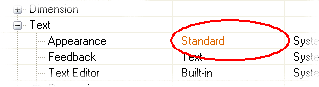 Instead of a single value setting
(value-type, range) there may also be settings which reference a style at
another node and all values defined in that style make up the values
of the setting. These settings are so-called style reference settings
and their current values are shown in orange
color.
Instead of a single value setting
(value-type, range) there may also be settings which reference a style at
another node and all values defined in that style make up the values
of the setting. These settings are so-called style reference settings
and their current values are shown in orange
color.
The main advantage of such style reference settings is that a certain set of
settings can be referenced in several places and if a value in such a
reference style changes, each setting which references this style will be
updated with that new value automatically. For example in Annotation is a
General/TextStyle implemented which is referenced in all settings
which display a text (e.g. view labels, text ..). With that centralized
approach it is very easy to simply change e.g. the font of the style
reference to be something different and all view labels and texts will be
created with that new font from then on.
To set a different style to be referenced or to modify values of the referenced style, double-click the style reference value (orange string) and the Style Reference UI like this pops up:
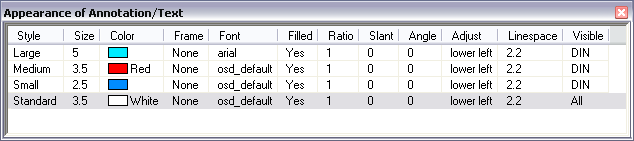
This UI shows you at a glance which styles you can select and which
values are currently defined for each of its sub settings. In the example
above, 4 styles are defined: Large, Medium, Small and Standard. Just
double-click one of these style names to use its sub setting values for the
style reference setting (here Annotation/Text/Appearance).
As you can see from the Style Reference UI, the text style reference setting
is made up out of 10 sub settings: Size, Color, Frame, Font, Filled, Ratio,
Slant, Angle, Adjust and Linespace. The last column Visible tells you
whether the style is visible in all styles which could be active at the root
node (here Annotation) or whether it should be visible only in the
current root node style (here DIN). That way the list of
visible/accessible styles can be kept short in case there are different
styles defined for e.g. ASME, JIS or ISO.
To modify a single value within this Style Reference UI, double-click the cell you want to change and the above introduced value change tool appears with the same features as already described.
The context menu on an item (complete row) allows you to do the following:
The context menu off an item allows you to reset all user values in all styles and to create a new style.
The Auto Store To behaviour of settings which are style reference settings in combination with reduced visibility is a bit different than described above. Usually a user value is stored automatically to the next active style along the settings path to the root. If you assign a style to a style reference setting which is only visible in the currently active root style, the value will be stored automatically in the root style no matter if there are any other styles active along the path to the setting. With this behaviour it is guaranteed that the style reference value will change if the root style changes. In this situation it may happen that the style assigned to the setting is no longer visible in the new root style and therefore it is bound automatically (stored to) to the root style.
Technical Note:
All sub settings and styles as shown in the Style Reference UI are
implemented as regular settings under a node (style node) which is flagged
to be a Style Container. Those nodes and all child nodes are
suppressed from the tree and can only be accessed via the Style Reference
UI. For more details see sd-def-setting.
Any modification at runtime in the Default Settings Browser is persistent. That means if you
then all these changes are maintained across Creo Elements/Direct Modeling sessions automatically.
On deactivation of a module (e.g. Annotation) or latest on exit of Creo
Elements/Direct Modeling one or more default setting files
("xxx.lsp") are written to a Default_Settings
subdirectory within the module specific customization subdirectory in your
personal
customization directory. User values are written to its own file and
each style writes its own file too. The filename is derived from the unique
path of a setting plus the unique name of a style and starts with a module
specific prefix.
Each file contains one call to sd-set-setting-values. This function fills the
internal database with all potential values for a specific setting related
to user values and styles.
As a site or corp admin you can simply move these files over to a site or
corp customization directory to provide site or corp specific style/default
values for specific settings. Corp values hide system defaults, site values
hide corp and/or system defaults and user values hide site, corp and/or
system defaults.
As described in the previous paragraphs the real and current value of a setting depends on the current style(s) situation and eventually on who (user, site, corp, system) provided values for a particular setting.
Whenever a style on a parent node changes, all settings which may be influenced by this change, update their current values automatically.
The algorithm how a setting value is determined is as follows:
The size of the Default Settings Browser and the width of each column is
persistent. Drag the divider between the header titles to make a column
wider or smaller. If you double-click the divider, the column to the left is
resized to optimally fit its current visible contents.
The Default Settings Browser can be pinned to make it reappear at a certain
screen location. To do so, do a right-click on the title bar of the Default
Settings Browser and check the Pinned option.
(sd-def-setting path
                :application             application
                :title                   title
                :value-type              value-type
                :include-none-item       include-none-item
                :range                   range
                :check-function          check-function
                :default-value           default-value
                :default-style-values    default-style-values
                :action                  action
                :description             description
                :proposals               proposals
                :style-container         style-container
                :style-reference         style-reference
                :help                    help)
  (sd-def-setting "Symbol/Appearance"
                  :application "Annotation"
                  :title "Appearance")  ;; to be localized
  (sd-def-setting "Symbol/Appearance/AbsAngle"
                  :application "Annotation"
                  :title "Abs Angle"
                  :value-type :angle
                  :default-value 0
                  :action #'(lambda (v) (format t "~%New abs angle: ~A" v))
                  :proposals `(,(/ pi 4) ,(/ pi 2))
                  :description "Absolute angle of new symbol.")
  (sd-def-setting "Symbol/Appearance/Size"
                  :application "Annotation"
                  :title "Size"
                  :value-type :length
                  :default-value 3.5
                  :default-style-values '(("Annotation" :din 5)
                                          ("Annotation" :jis 2.8)
                                          ("Annotation/Symbol/Appearance" :standard 3))
                  :action #'(lambda (v) (format t "~%New size: ~A" v))
                  :proposals '(2.5 3.5 5 7 10 14)
                  :description "Size of new symbol.")
  (sd-def-setting "General/TextStyle"
                  :application "Annotation"
                  ;; :title not needed because style containers are invisible
                  :style-container t)
  (sd-def-setting "General/TextStyle/Size"
                  :application "Annotation"
                  :title "Size"  ;; to appear as column header in Style Reference UI
                  :value-type :positive-length
                  :action  #'(lambda (v) (format t "~%New text size: ~S" v))
                  :proposals '(1 2 3 4 5)
                  :default-value  3.5
                  :default-style-values `(("Annotation/General/TextStyle" :standard 5)
                                          ("Annotation/General/TextStyle" :ansi ,(* 0.18 25.4))
                                          ("Annotation/General/TextStyle" :din 3.5)
                                          ("Annotation/General/TextStyle" :jis 2.5))
                  :description "Size of text")
  (sd-def-setting "General/TextStyle/Color"
                  :application "Annotation"
                  :title "Color"  ;; to appear as column header in Style Reference UI
                  :value-type :rgb-color
                  :action  '(lambda (v) (format t "~%New color: ~S" v))
                  :default-value (sd-rgb-to-color 1,1,1)
                  :default-style-values `(("Annotation/General/TextStyle" :standard ,(sd-rgb-to-color 0.0,0.625,1.0))
                                          ("Annotation/General/TextStyle" :din ,(sd-rgb-to-color 1.0,1.0,0.0)))
                  :description "Color of text")
  (sd-def-setting "Text/Appearance/TextStyle"
                  :application "Annotation"
                  :style-reference "Annotation/General/TextStyle"
                  :title "Text Style"
                  :action #'(lambda (v)
                              (let ((style-values (sd-get-setting-style-values
                                                   "Annotation/General/TextStyle"
                                                   v
                                                   '("Size" "Color"))))
                                (format t "~%Size in style ~S: ~S" v (first style-values))
                                (format t "~%Color in style ~S: ~S" v (second style-values))))
                  :default-value :standard
                  :description "Text Style Reference")
(sd-get-setting path)
  (sd-get-setting "Annotation/Symbol/Appearance/Size")
    returns:
      '(:GUI-SOURCE "System"
        :SOURCE :SD
        :VALUE 3.5
        :PROPOSALS (2.5 3.5 5 7 10 14)
        :DESCRIPTION "Size of new symbol."
        :ACTION (LAMBDA (V) (FORMAT T "~%New size: ~A" V))
        :DEFAULT-VALUE  (:SD (:STYLES (("Annotation" :DIN 5)
                                       ("Annotation" :JIS 2.8)
                                       ("Annotation/Symbol/Appearance" :STANDARD 3))
                              :DEFAULT 3.5))
        :VALUE-TYPE :LENGTH
        :TITLE "Size"
        :APPLICATION "Annotation"
        :NODE-ID 1788280)
(sd-get-setting-value path)
  ;; 1. make sure that "Standard" style is set at parent node:
  (sd-set-current-settings-style "Annotation/Symbol/Appearance" :standard)
  ;; 2. get current value:
  (sd-get-setting-value "Annotation/Symbol/Appearance/Size")
    returns: 3
(sd-set-setting-value path
                      :value        value
                      :level        level
                      :style-path   style-path
                      :style        style
                      :call-action  call-action
                      :update-pds   update-pds)
(sd-set-setting-value "Annotation/Symbol/Appearance/Size" :value 5.5)
  (sd-set-setting-value "Annotation/Symbol/Appearance/Size"
                        :value 4.8
                        :level :sd
                        :style-path "Annotation"
                        :style :din)
(sd-delete-setting-value :path           path
                         :path-pattern   path-pattern
                         :level          level
                         :default-value  default-value
                         :styles         styles
                         :call-action    call-action
                         :update-pds     update-pds)
(sd-delete-setting-value)
  (sd-delete-setting-value :path-pattern "Annotation/Symbol/Appearance/*"
                           :level '(:user :site :corp))
  (sd-delete-setting-value :path "Annotation/Symbol/Appearance/Size"
                           :level '(:user :sd)
                           :default-value nil
                           :styles '("Annotation" :din
                                     "Annotation/Symbol/Appearance" :standard))
(sd-set-setting-values :level        level
                       :application  application
                       :title        title
                       :style-path   style-path
                       :style        style
                       :values       values
                       :visible-if   visible-if)
  (sd-set-setting-values :application "Annotation"
                         :level :user
                         :values `("Symbol/Appearance/Size" 5
                                   "Symbol/Appearance/Adjust" :bottom_left
                                   "General/TextStyle/Color" ,(sd-rgb-to-color 0,0,1)))
  (sd-set-setting-values :application "Annotation"
                         :level :user
                         :title "Standard"
                         :style-path "Annotation/Symbol/Appearance"
                         :style :standard
                         :values `("AbsAngle" ,(sd-deg-to-rad 5)
                                   "Size" 10))
  (sd-set-setting-values :application "Annotation"
                         :level :site
                         :title "Site Text Style"
                         :style-path "Annotation/General/TextStyle"
                         :style :site_style
                         :visible-if :jis
                         :values `("Size" 4.2
                                   "Color" ,(sd-rgb-to-color 1,0,1)))
(sd-update-current-setting-values :subpath      subpath
                                  :call-action  call-action)
  (sd-set-setting-values :application "Annotation"
                         :level :user
                         :title "Standard"
                         :style-path "Annotation/Symbol/Appearance"
                         :style :standard
                         :values `("AbsAngle" ,(sd-deg-to-rad 5)
                                   "Size" 10))

  (sd-update-current-setting-values :subpath "Annotation/Symbol/Appearance")
(sd-freeze-setting-value :path          path
                         :path-pattern  path-pattern
                         :subpath       subpath)
(sd-freeze-setting-value :path "Annotation/Symbol/Appearance/Size")
(sd-freeze-setting-value :path-pattern "Annotation/Symbol/Appearance*")
(sd-freeze-setting-value)
(sd-unfreeze-setting-value :path          path
                           :path-pattern  path-pattern
                           :subpath       subpath)
(sd-unfreeze-setting-value :path "Annotation/Symbol/Appearance/Size")
(sd-unfreeze-setting-value :path-pattern "Annotation/Symbol/Appearance*")
(sd-unfreeze-setting-value)
(sd-set-setting-modifiable-flag :path          path
                                :path-pattern  path-pattern
                                :subpath       subpath
                                :modifiable    modifiable)
  (sd-set-setting-modifiable-flag :path "Annotation/Symbol/Appearance/Size"
                                  :modifiable nil)
  (sd-set-setting-modifiable-flag :subpath "Annotation/Symbol/Appearance"
                                  :modifiable nil)
(sd-set-setting-modifiable-flag)
(sd-finalize-application-settings application)
(sd-unsubscribe-event (sd-module-deactivation-event "ANNOTATION")
                      'finalize-Annotation-settings-on-deactivation)

(defun finalize-Annotation-settings-on-deactivation (&rest args)
  (declare (ignore args))
  (sd-finalize-application-settings "Annotation"))

(sd-subscribe-event (sd-module-deactivation-event "ANNOTATION")
                    'finalize-Annotation-settings-on-deactivation)
(sd-force-store-application-settings application)
(sd-force-store-application-settings "Annotation")
(sd-force-reload-application-settings application)
(sd-force-reload-application-settings "Annotation")
(sd-create-settings-style style-path style
                          :title       title
                          :secured     secured
                          :visible-if  visible-if)
(sd-create-settings-style "Annotation" :my_din :title "My DIN")
  (sd-create-settings-style "Annotation/General/TextStyle" :din_text_style
                            :title "DIN Text Style"
                            :visible-if '(:din :my_din))
  (sd-create-settings-style "Annotation/Text/Appearance"
                            :text_style :title "Text Style")
    => nil
(sd-delete-settings-style style-path style
                          :forced                 forced
                          :update-setting-values  update-setting-values)
  (sd-delete-settings-style "Annotation/General/TextStyle" :site_style)  => nil
  (sd-delete-settings-style "Annotation/General/TextStyle" :site_style :forced t)  => t
(sd-delete-all-settings-styles style-path
                               :forced         forced
                               :incl-children  incl-children)
(sd-delete-all-settings-styles "Annotation" :incl-children t)
(sd-set-current-settings-style style-path style
                               :update-pds             update-pds
                               :update-setting-values  update-setting-values)
(sd-set-current-settings-style "Annotation" :din)
(sd-get-current-settings-style style-path)
(sd-get-current-settings-style "Annotation") => :din
(sd-reset-current-settings-styles :update-pds update-pds)
(sd-reset-current-settings-styles)
(sd-get-setting-style-values style-path style settings-list)
  (multiple-value-bind (results user-flag)
    (sd-get-setting-style-values "Annotation/General/TextStyle" :ansi '("Size" "Color")))
      => results   = '(4.572 255)
         user-flag = t
  (sd-set-setting-value "Annotation/General/TextStyle/Size"
                        :style-path "Annotation/General/TextStyle"
                        :style :din
                        :value 5.55)
  (sd-set-setting-value "Annotation/General/TextStyle/Color"
                        :style-path "Annotation/General/TextStyle"
                        :style :din
                        :value (sd-rgb-to-color 1,0,0))
  (multiple-value-bind (results user-flag)
    (sd-get-setting-style-values "Annotation/General/TextStyle" :din '("Size" "Color")))
      => results   = '(5.55 16711680)
         user-flag = :all
  (sd-delete-setting-value :path-pattern "Annotation/General/TextStyle/*"
                           :default-value nil
                           :styles '("Annotation/General/TextStyle" :din))
  (multiple-value-bind (results user-flag)
    (sd-get-setting-style-values "Annotation/General/TextStyle" :din '("Size" "Color")))
      => results   = '(3.5 16776960)
         user-flag = nil
(sd-get-setting-styles-range-list path)
  (sd-get-setting-styles-range-list "Annotation")
    => '((:ansi :label "ASME") (:din :label "DIN") (:iso :label "ISO")
         (:jis :label "JIS"))

  (sd-get-setting-styles-range-list "Annotation/General/TextStyle")
    => '((:large-inch :label "Large (inch)") (:medium-inch :label "Medium (inch)")
         (:small-inch :label "Small (inch)") (:standard :label "Standard"))
(sd-do-on-all-settings function :path-pattern path-pattern)
  (defun count-size-settings ()
    (let ((count 0))
      (sd-do-on-all-settings #'(lambda (path data)
                                 (declare (ignore path data))
                                 (incf count))
                             :path-pattern "*/Size")
      count))
(sd-show-setting path
                 :select-item     select-item
                 :scroll-visible  scroll-visible
                 :expand          expand
                 :collapse        collapse
                 :expand-all      expand-all
                 :collapse-all    collapse-all
                 :collapse-other  collapse-other
                 :show-browser    show-browser)
  (sd-show-setting "Annotation/Text")

  (sd-show-setting "Annotation/Symbol" :collapse-other t)
| |
|
| © 2024 Parametric
Technology GmbH (a subsidiary of PTC Inc.), All Rights Reserved |