Welding: Sequencing
Creo Parametric 12.4.0.0
User Interface Location: Click >  Welding, select a
  Spot Weld feature, and click
  Sequencing View.
Welding, select a Spot Weld feature, and click Sequencing View.Videos
Description
You can now control the order in which spot welds will be manufactured using the new Sequencing View. This is a view in the  Weld and Joint Tree that displays only the connections of the selected feature.
Weld and Joint Tree that displays only the connections of the selected feature.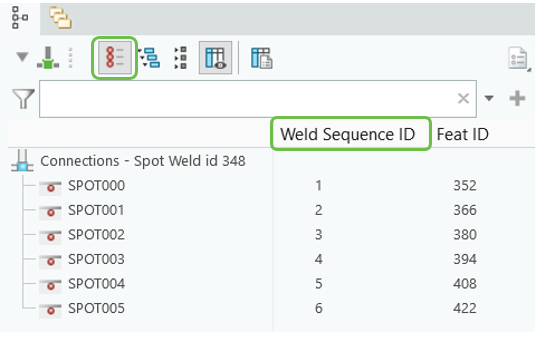
You can change the Weld Sequence ID by entering a number, or by dragging and dropping the spot welds up or down in the list. You can select and move multiple spot welds at once.
When you export the model information in xMCF format, the spot weld sequencing information is exported.
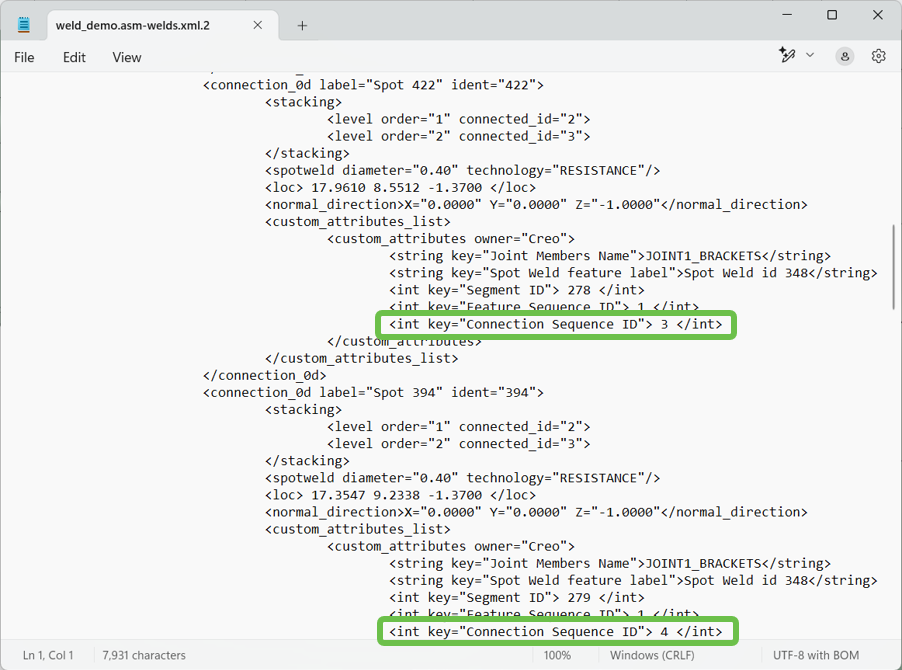
You can choose one of the following options to determine which parameters define the sequence in which the connections in the file are manufactured:
• Regeneration & sequence ID—The connections in the file will be manufactured based on the feature regeneration order and the sequence within the feature.
• Feature & sequence ID—The connections in the file will be manufactured based on the Feature Sequence ID order and the sequence within the feature.

Benefits
• Reduces errors by modifying the welding sequence inside of Creo
• Easy to use Sequence View
Additional Information
Tips: | None. |
Limitations: | No known limitations. |
Does this replace existing functionality? | No. |
Configuration option associated with this functionality: | None. |