Engineering Notebook in Creo
Creo Parametric 12.4.0.0
User Interface Location: Click >  Engineering Notebook.
Engineering Notebook.Videos
Description
Engineering Notebook (based on Mathcad) is now directly included within Creo.
• The Creo installer provides an opt-in option to install the Engineering Notebookapplication from the Customize Application tab on the installer. (There is no separate installer.)
The Engineering Notebook is installed at C:/Program Files/Common Files/PTC/Creo/EngineeringNotebook/<release_no>.
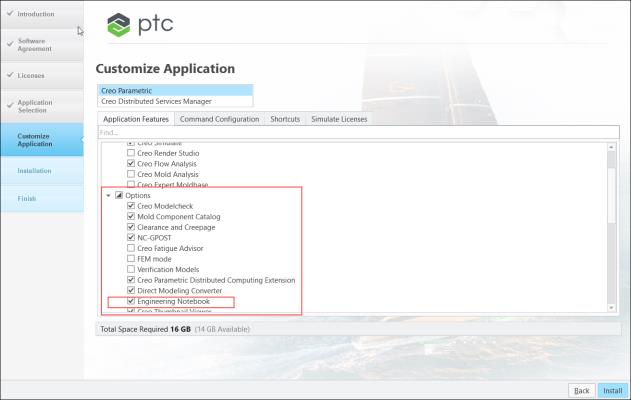
• Engineering Notebook is a new feature option that is included in the CREOPMA_T2 to CREOPMA_T5 Creo licenses. (It is not a separate license.)
• Once Creo is installed, the Engineering Notebook is available to use, exclusively from the Creo Applications menu.
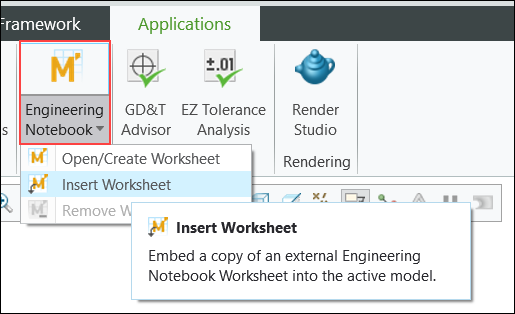
• Engineering Notebook allows users to embed worksheets with their Creo data to document relevant engineering calculations and drive and analyze Creo parameters.
The embedded worksheet is saved to the Creo model and can only be accessed through Creo.
Benefits
This enhancement provides the following benefits:
• Seamless installation of Engineering Notebook as a part of the Creo install
• Seamless licensing of Engineering Notebookas a feature in Creo
• Improved usability and productivity
Additional Information
Tips: | None. |
Limitations: | The Engineering Notebook cannot be shared as a network shared application. Local Help installation is not available for Engineering Notebook. Help is only available at https://www.ptc.com/en/support/help/Mathcad/ and is directly invoked from the Engineering Notebook application. |
Does this replace existing functionality? | No. |
Configuration option associated with this functionality: | None. |