Style: Edit References and Replace References
Creo Parametric 12.4.0.0
User Interface Location: With the Style tab open, select features, references, or sets of references, and then do any of these things:
• Edit References
Do either of these things:
◦ In the Style Tree, right-click the entity and choose  Edit References.
Edit References.◦ Click > > Edit References.
Edit References.• Replace References
◦ Click > >  Replace References.
Replace References.Videos
Description
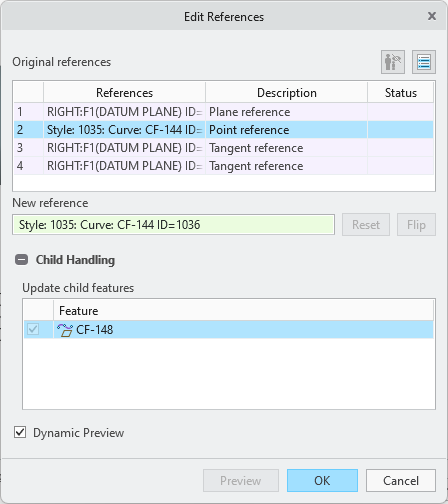
In Creo Parametric 12, Edit References and Replace References capabilities have been added to Style. These tools help you easily redefine your curves and surfaces. You can select new references within the tools, without leaving the Style modeling environment.
Edit References and Replace References capabilities have been added to Style. These tools help you easily redefine your curves and surfaces. You can select new references within the tools, without leaving the Style modeling environment.• Replace References enables you to replace one Style entity with another.
Replace References enables you to replace one Style entity with another.• Edit References enables you to take a Style entity and change the element that it is referencing.
Edit References enables you to take a Style entity and change the element that it is referencing.• You can flip the direction of the new references as needed.
• You can automatically display a preview of the results every time you select a new reference using Dynamic Preview, or manually display a preview of the references that were updated so far using Preview.
• You can investigate the Child Handling in both Edit and Replace References.


Benefits
• This enhancement makes it easier to rework your Style models, allowing you to save time and effort previously lost to remodeling or complicated changes.
• Makes Style more consistent with the core Creo mode.
Additional Information
Tips: | None. |
Limitations: | • Vertices do not have unique IDs. This results in the tool not separating a curve/edge and its vertices when the Row Display is set to list all uses of a reference in a single row. This will result in a warning indicator. • Flip is not available when the child feature or reference has failed. • Flip will only work if any used trim/extended ends are defined by values, and not if the trim/extended ends are defined by references. |
Does this replace existing functionality? | No. |
Configuration option associated with this functionality: | None. |