Creo Simulate—Glued Contact Interface
Creo Parametric 12.4.0.0
User Interface Location: You can access this command from the following two locations:
• Click > > > . The Auto Detect Weld Feature dialog box opens. Select the Use Glued Interface check box.
• Click >  Weld to open the Weld Definition dialog box. Select Weld Feature as the type of weld and select a weld from your model. Select the Use Glued Interface check box.
Weld to open the Weld Definition dialog box. Select Weld Feature as the type of weld and select a weld from your model. Select the Use Glued Interface check box.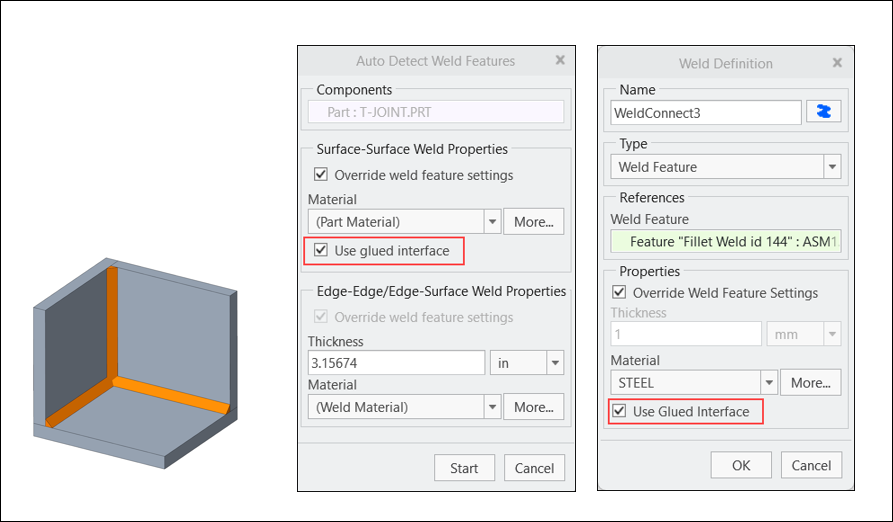
Videos
Description
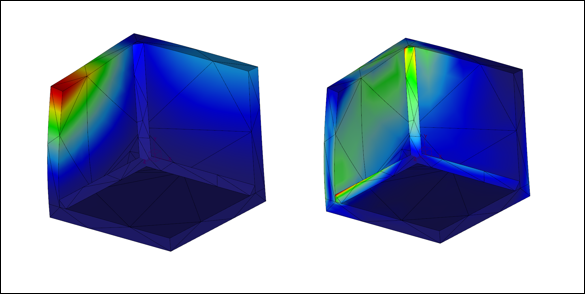
The glued weld interface is a new contact type available for solid welds. By default, a bonded interface is automatically created for solid welds. When two or more solid welds occupy the same space (have overlapping volumes) they sometimes fail to mesh. If a glued interface is used instead, it meshes successfully and solves for overlapping solid welds.
Benefits
This enhancement provides the following benefits:
• It is easy to use
• Resolves meshing failures
• Provides accurate results
Additional Information
Tips: | None. |
Limitations: | This feature has the following limitations: • It is only available in structure mode. • It supports rigid behavior only (flexible in future). • It is only available for linear analyses. |
Does this replace existing functionality? | No. |
Configuration option associated with this functionality: | None. |