Creo Simulation Live—Fasteners and Preloads
Creo Parametric 12.4.0.0
User Interface Location: Click  Fasteners from the Connections group on from the Live Simulation tab.
Fasteners from the Connections group on from the Live Simulation tab.Videos
Description
You can now create fastener idealizations, apply preloads, and evaluate results for the fasteners. You can probe the simulation result quantities that are specifically for fasteners. In previous releases of Creo Simulation Live, a user was not able to create fastener idealizations.
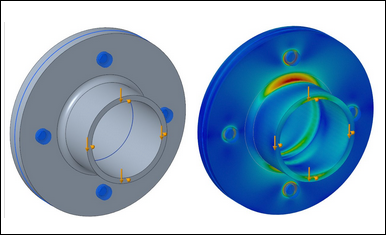
• Creo Simulation Live now supports fastener idealizations. This includes the following features:
◦ A library of standard fastener materials
◦ Selection of an inner surface of a bolt hole or bolt axis
◦ Automatic assignment of bolt dimensions that can be modified

◦ Support for fasteners through separated coaxial holes as shown in the following figure:

• The ability to define preloads on idealized fasteners. Preloads can be defined based on the clamp load, grip length adjustment or tightening torque.

• Support for Simulation probes for new types of fastener-specific results including the following:
◦ Axial stress and shear force
◦ Torsional moment
Benefits
This enhancement provides the following benefits:
• Significant time savings when simulating bolted structures
• Bolt specific simulation probes
• Fully transferable to Creo Ansys Simulation
Additional Information
Tips: | None. |
Limitations: | No known limitations. |
Does this replace existing functionality? | No. |
Configuration option associated with this functionality: | None. |