Customizing columns in the Conflicts dialog box
Creo Parametric 13.4.0.0
User Interface Location: Conflicts dialog box
Videos
Description
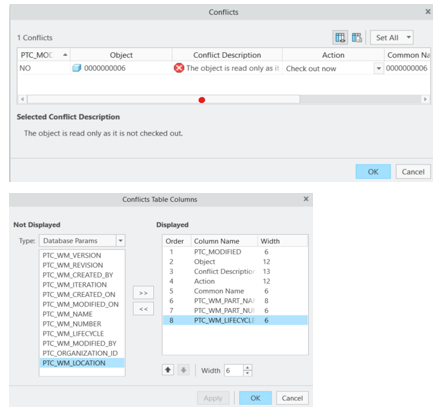
The Conflicts dialog box now supports following capabilities:
• Add or remove specific model and database parameters as columns. Object, Conflict Description, or Action columns cannot be removed.
• Toggle between the default and customized views as needed.
• Arrange columns in any order.
• Display additional columns, such as Common Name and Lifecycle State, for more meaningful information during checkout
Benefits
This enhancement provides the following benefits:
• Display more relevant information to support decision-making during content checkout.
• Improve productivity by surfacing key parameters directly in the dialog.
• Enhance data management with flexible column customization.
Additional Information
Tips: | Arrange columns to match workflow needs. |
Limitations: | No known limitations. |
Does this replace existing functionality? | No. |
Configuration option associated with this functionality: | None. |