Improved 3D Thickness Analysis
Creo Parametric 13.4.0.0
User Interface Location: In the Analysis tab, click  Thickness.
Thickness.Videos
Description
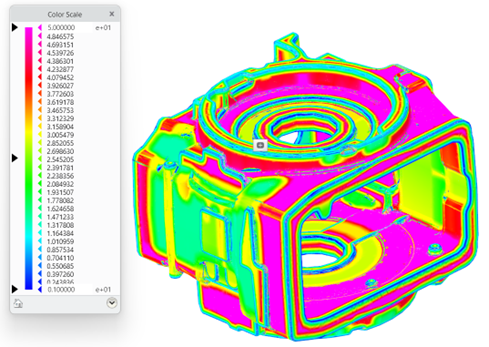
The 3D thickness analysis has been enhanced to improve accuracy and result interpretation by introducing Rolling ball method and full‑color scale visualization. The Rolling ball method is now set as the default method for 3D thickness analysis. This method simulates a sphere rolling along a part’s interior to measure the largest sphere diameter that fits at each point.
The Ray tracing method is still available and has been enhanced to include a full color legend. Previously, thickness analysis supported only the Ray tracing method with a three-color legend.
Benefits
• Detects thin areas that can lead to weak regions and thick areas that may cause cooling issues during manufacturing.
• Provides accurate and smooth thickness results on complex geometry using the rolling ball method.
Additional Information
Tips: | None. |
Limitations: | No Limitations |
Does this replace existing functionality? | No. |
Configuration option associated with this functionality: | None. |