Fastener Preloads in Creo Ansys Simulation
About Preloads
A fastener preload simulates the preloaded condition (no external load) of a fastener in which a fastener is tightened by applying torque to the bolt head or nut. The tightening process compresses the elements together and secures the joint. This compressive force on the structural elements is called the clamping force or clamp load and it results in a reduction of the grip length, which is the distance between the bolt head and the nut (or threaded hole in the case of a screw) after tightening. You can define a preload using any of these three quantities—torque applied to the head or nut, clamping force, or grip length adjustment.
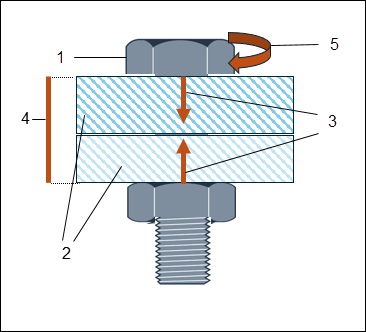
1. Bolt head
2. Flanges represented as two structural elements
3. Clamping force or clamp load
4. Grip length
5. Tightening torque applied to bolt head
Defining Preloads
Perform the following steps to define a preload on a fastener.
1. Click  Preload from the Loads group. The Preload dialog box opens. The References area of the dialog box displays all the fasteners in the model.
Preload from the Loads group. The Preload dialog box opens. The References area of the dialog box displays all the fasteners in the model.2. Select one or more fastener from the References box.
3. Select one of the following values from the Define by list to specify the method for applying the preload:
◦ Clamp load—Specify the value of the preload developed in the bolt shank with appropriate units of force.
◦ Grip length adjustment—Specify how much the flanges are compressed as a result of the application of the preload. Select the appropriate units of length.
◦ Torque—Specify the value of torque that must be applied in order to tighten the bolt to its preloaded condition. The value must be a positive non-zero value. Additionally specify the following parameters:
▪ Bolt diameter—Specify the bolt diameter.
▪ Torque coefficient—Specify the coefficient of friction. This depends on the material properties of the bolt and flanges. The value must be a positive non-zero value less than 1.
4. Click OK to create the preload. The preload is displayed in the Model Tree under the Loads node.
When you copy a preload from one study to another the associated fasteners are also copied to the other study. When you delete a fastener the associated preload is also deleted.