Other Resources—Creo TOOLKIT Documentation
Creo TOOLKIT is the C-language customization toolkit for Creo Parametric. It enables customers and third parties to expand Creo Parametric capabilities by writing C-language code and seamlessly integrating the resulting application into Creo Parametric. Creo TOOLKIT provides an extensive library of C functions that enables the external application to access the Creo Parametric database and user interface in a controlled and safe manner.
 |
Creo TOOLKIT is supported only for Creo Parametric. It is not supported for the other Creo applications.
|
The toolkit documentation includes an online source known as the APIWizard, and the User’s Guide in PDF format.
The APIWizard contains information about the function’s syntax in Creo TOOLKIT and descriptions from the User’s Guide.
In addition to the C language-based toolkit, Creo also provides a suite of toolkits for other languages such as Object-oriented languages like C++, JAVA, HTML, JavaScript, and Visual Basic.
Accessing Creo Toolkit Documentation from www.ptc.com
To access Creo TOOLKIT and other toolkit guides and related documentation www.ptc.com:
2. In the Product field, start entering the product name and the select the product from the drop-down list. For example, Creo Parametric.
3. Select the respective Release version of Creo or N/A for .
4. In the Document Type field, select the document type:
◦ User and Reference Guides—Provides links to all User and Reference guides.
◦ Read this first / Release Notes —Provides links to all the Release Notes and Read This First.
◦ Configuration Options—Provides links to all Configuration Options CSVs in zipped format.
5. Click Search.
The search results list the reference documents (for example C, C++ JAVA, VB, Web.link, and Creo.JS) that match your search criteria.
Accessing Creo Toolkit Documentation from the Help Center
The Creo TOOLKIT APIWizards have been replaced by a new Help Center format on the Creo Parametric CD image. Each Creo TOOLKIT folder now contains its respective Help Center, located as follows:
|
Name of Help Center
|
Name of Toolkit folder
|
Corresponding location on CD Image
|
Link to Help Center on ptc.com
|
|
Creo TOOLKIT Help Center
|
protoolkit
|
<creo_loadpoint>\<datecode>\Common Files\protoolkit\online_help
|
|
|
Creo Object Toolkit C++ Help Center
|
otk_cpp_doc
|
<creo_loadpoint>\<datecode>\Common Files\otk_cpp_doc\online_help
|
|
|
Creo Object Toolkit JAVA Help Center
|
otk_java_doc
|
<creo_loadpoint>\<datecode>\Common Files\otk_java_doc\online_help
|
|
|
Creo.JS Help Center
|
creojs
|
<creo_loadpoint>\<datecode>\Common Files\creojs\online_help
|
|
|
VB API Help Center
|
vbapi
|
<creo_loadpoint>\<datecode>\Common Files\vbapi\online_help
|
|
|
Web.Link™ Help Center
|
weblink
|
<creo_loadpoint>\<datecode>\Common Files\weblink\online_help
|
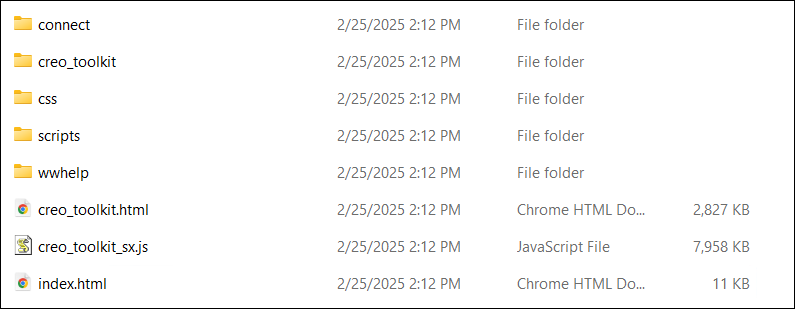
Navigate to any of the folders mentioned in the above table and click index.html to open the Help Center in your default browser