GD&T Advisor Enhancement: Rule-Based Selection Methods and Datum Reference Features for Collecting Semantic References
Creo+
User Interface Location: N/A
Description
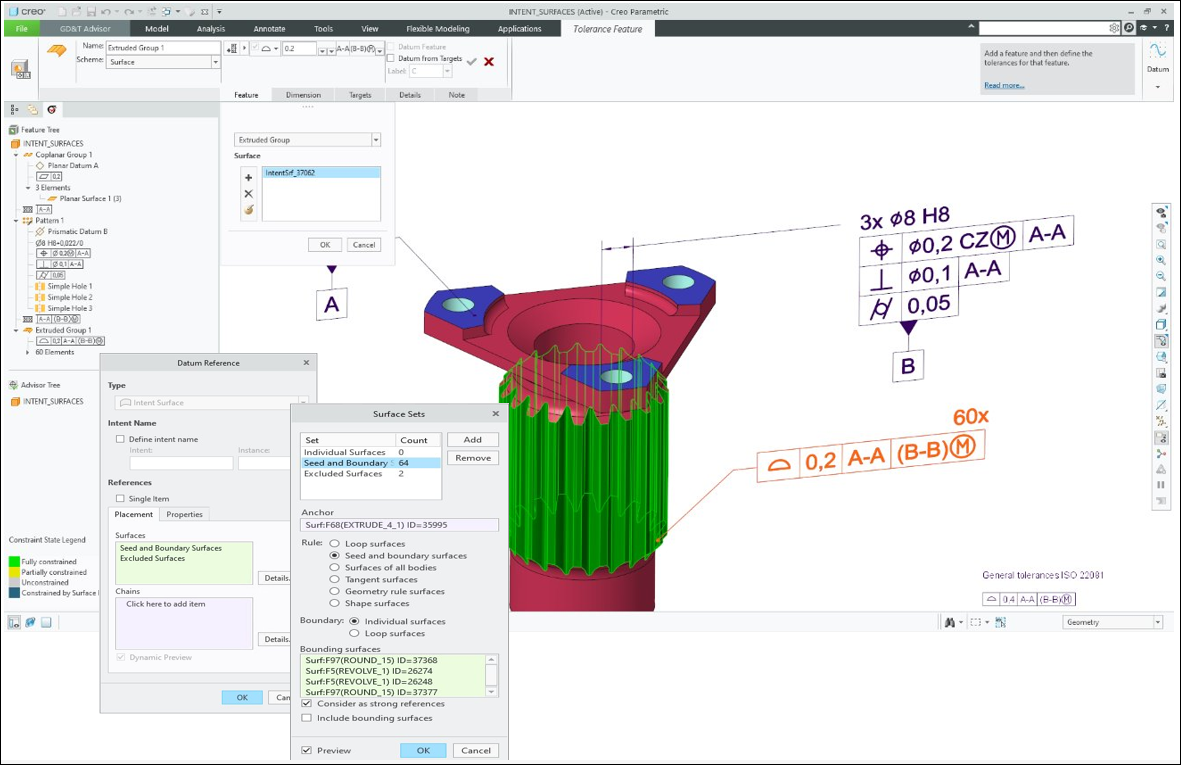
Previously, GD&T Advisor did not support rule-based collections or datum reference features. As a result, for complex geometries, users could only select manually multiple surfaces, which was both tedious and non-parametric for model updates.
With this enhancement, GD&T Advisor uses new methods for collecting semantic references when creating or validating annotations:
• Rule-based collection methods: GD&T Advisor can validate rule-based reference collections that were specified for annotations. For example, the following rule-based collections that were collected by Creo annotations, are now supported:
◦ Seed-and-boundary
◦ Loop surfaces
• Datum reference features (DRF): DRFs of type intent surface can be used by GD&T Advisor for the creation of new functional features. For example, when creating a new functional feature in GD&T Advisor, the user can leverage an existing DRF in the model that contains:
◦ Collection of individual surfaces
◦ Rule-based collections
When the model changes, Creo re-evaluates the rule-based collections and updates them accordingly in GD&T Advisor.
Benefits
GD&T Advisor users can now take advantage of the rich rule-based selection methods of native Creo, significantly reducing the time required to select references for annotations.
Additional Information
Tips: | None. |
Limitations: | Currently, GD&T Advisor does not use multiple surfaces collected by a rule-based selection or by a Datum Reference Feature (DRF) for creating pattern features. Currently, these surfaces are used only for the definition of other functional features, such as Extruded group. |
Does this replace existing functionality? | No. |
Configuration option associated with this functionality: | None. |