ECAD_HINT.MAP File Enhancements
Creo+
User Interface Location: Click > > > , Parameters, ECAD_Hint. map file.
Description
The ecad_hint.map and ecad_hint.add files are used for inter-operability between Creo and ECAD applications. The ecad_hint.map file is used to define mapping rules and settings for how ECAD data is imported, exported, and interpreted in Creo. The ecad_hint.add file is an additional file, that complements the ecad_hint.map file and is used to define additional mapping rules in the ecad_hint.map file.
The following functionality is enhanced or added:
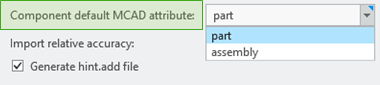
• A configuration option is added to set the default value of the MCAD_TYPE attribute of components to Part or Assembly in the ecad_hint.add file when importing designs. The MCAD_TYPE attribute specifies the type of representation that is assigned to a particular ECAD component when it is imported into the Creo environment.
When the ecad_hint.map file already contains the MCAD_TYPE attribute value for a specific component it will take precedence over the configuration.
• When a component has a design specific ECAD_NAME and ECAD_ALT_NAME parameters, a new configuration option in Creo allows you to use these values instead of the ecad_hint.map file definitions when exporting to EMN. Set Component name to Parameter to use design values instead of ecad_hint.map definitions.
ECAD_NAME and ECAD_ALT_NAME parameters are used to define the primary and secondary identifiers for a component in the ECAD design tool.

• The ability to specify components type as mechanical or electrical using a new attribute, ECAD_PART_TYPE, in the ecad_hint.map file. The ECAD_PART_TYPE is used to designate parts that have an electrical or mechanical function in the design.
When this attribute is defined in the ecad_hint.map file, the value is propagated during the import to components that do not have the ECAD_PART_TYPE parameter set. On export, the ecad_hint.map is not used, component parameter values are exported.
Benefits
More flexibility in defining and managing the mapping file.
Additional Information
Tips: | None. |
Limitations: | No known limitations. |
Does this replace existing functionality? | No. |
Configuration option associated with this functionality: | ecad_export_component_name ecad_default_mcad_type |