Creo Simulate-Composite Results Display
Creo+
User Interface Location: Do the following:
1. After creating and running an analysis on a composite structure in Creo Simulate, open the Result Window Definition dialog box.
2. Under Include contributions from shells, select of ply as shown in the next figure:
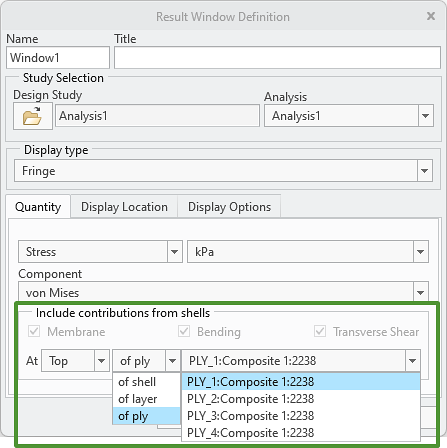
The laminate objects of the composite feature appear in the adjacent box.
3. Select a laminate object from the list.
4. Click OK to view the analysis results for the entire laminate object.
Description
You can now view simulation stress results for an entire laminate object in Creo Simulate, helping you focus on it for a clearer understanding of the analysis.
Benefits
This enhancement improves productivity by showing analysis results for each ply, making it easier to understand the analysis results of the composite design.
Additional Information
Tips: | None. |
Limitations: | No known limitations. |
Does this replace existing functionality? | No. |
Configuration option associated with this functionality: | None. |