Feature Presets
Creo+
User Interface Location:
• Within the feature tabs of supported features, click Presets to open the Feature Presets tab:

• Access the feature presets for a supported feature by right-clicking the feature command and opening a contextual menu:

Videos
If the video does not play, watch it on YouTube.
Description
In Creo+ the concept of feature presets is introduced. This enables you to define and manage sets of preferred feature options.
Enhancement Details
Capture the most important, frequently-used combinations of feature options, and save them as presets. Recently used feature option combinations are captured automatically as presets. You have direct access to user-defined or recently used presets through the feature’s Preset panel, or in the right-click menu when you hover over the feature icon on the tab user interface. Supported features: Hole, Extrude, Revolve, Round, Chamfer, and Curve from Equation.
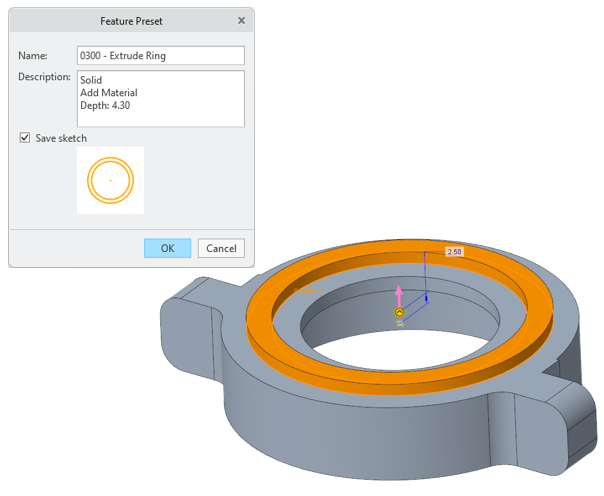
• Recently used list
For each feature, the settings of the five most recent features that you create during the session are saved as entries on the recently used list, for quick access.
• Saved Presets
Capture feature options and settings under a user-defined name and description. Does not apply to sketch placement or other placement-dependent settings.
After you save a new preset, you can apply it to another instance of the same feature, update it, and delete it. You can set it as the default, to apply the settings of the selected preset entry by default when you create a feature of the same type.

• Supported features
Features that currently support presets are Hole, Extrude, Revolve, Round, Chamfer, and Curve from Equation.
• Administration
Presets are stored as part of the overall user interface customization in a .ui file. Feature-specific presets can be imported and exported using these files.
• Default options
For each feature, you can define which type of preset is the default when the feature tool starts. Choose the out of the box system settings, the most recent presets for that feature, or saved presets.

Previously, you couldn’t quickly access a specific combination of feature options.
Benefits
Improved productivity by quickly accessing the most frequently used feature option combinations
Additional Information
Tips: | None. |
Limitations: | No known limitations. |
Does this replace existing functionality? | No. |
Configuration option associated with this functionality: | None. |