Transition Plies
Creo+
User Interface Location: In Composite Design, click > .
Videos
If the video does not play, watch it on YouTube.
Description
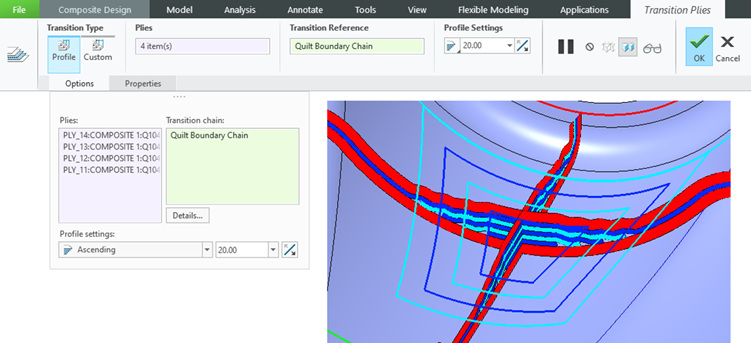
You can now use the new Transition Plies command to shorten or extend one or more plies.
To create a transition effect for multiple plies, the plies must have at least a partially common boundary from which you can select the transition chain and specify the offset value. This results in an adjustment of the selected ply contours.
You can create a profile transition by defining a constant offset value, or create a custom transition by defining variable transition values.
You can create multiple Transition Ply features within a Composite feature.
Benefits
This enhancement is useful when changing the existing ply contours to achieve a gradual change of a laminate thickness or when changing the contour of a single ply by an offset value of selected transition edges.
With this enhancement, you can change ply contours without redefining manual plies and locally create a gradual change of laminate thickness.
Additional Information
Tips: | None. |
Limitations: | No known limitations. |
Does this replace existing functionality? | No. |
Configuration option associated with this functionality: | None. |