Core Ply
Creo+
User Interface Location: In Composite Design, click > .
Videos
If the video does not play, watch it on YouTube.
Description
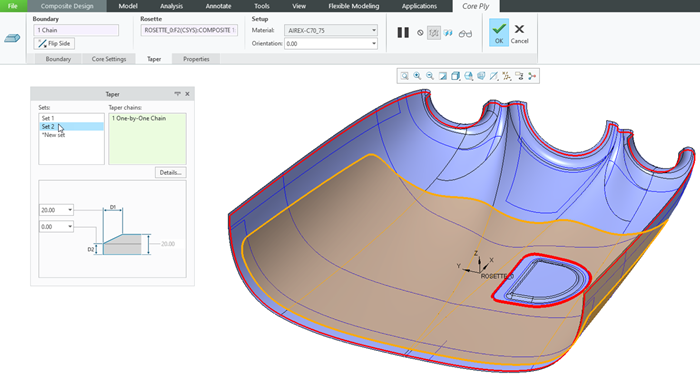
You can now use the new Core Ply command to create a core ply object in the Laminate Tree.
A core ply consists of a boundary chain, a material definition, a rosette coordinate system, an orientation angle, the drop-off value, and an optional taper definition. In addition to the required outer boundary loop, you can also include inner loops.
You can define a taper on each tangent chain of the outer and inner loops. You can also apply multiple taper values per boundary loop if you select several tangent chains.
To set the default prefixes for the name and sequence of a core ply, click > . In the Creo Parametric Options dialog box, click > . Specify the values under Name Policy Settings. Alternatively, set the following configuration options:
• composite_def_core_name_prefix—Specifies the prefix applied to the name of a new core ply.
• composite_def_core_seq_prefix—Specifies the prefix applied to the sequence of a new core ply.
Benefits
This enhancement is useful when you design a composite layup. Previously, it was not possible to define a core ply object in Creo.
With this enhancement, you can create core ply objects as one of the key laminate objects in a composite design. You can then use it to derive a flat pattern for the manufacturing of the composite part.
Additional Information
Tips: | None. |
Limitations: | The smallest segment for the core taper definition is a complete tangent chain. Outer edges of the layup surface are not supported for core ply loop definition. |
Does this replace existing functionality? | No. |
Configuration option associated with this functionality: | New configuration options: • composite_def_core_name_prefix Core* • composite_def_core_seq_prefix Sequence* |