Reference Designations Propagation to Feature Names
Creo+
User Interface Location:
1. In the Cabling application, click > . The Auto Designator dialog box opens.
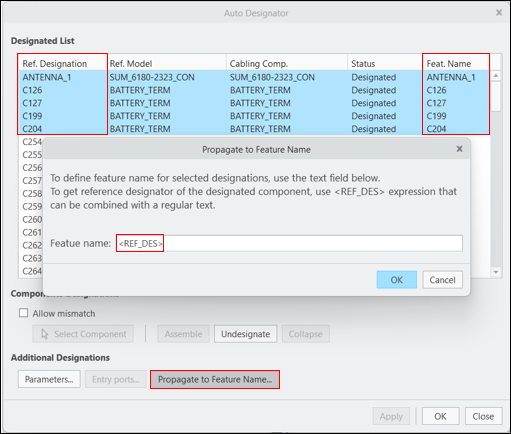
2. Select the reference designations and click Propagate to Feature Name. The Propagate to Feature Name dialog box opens.
 |
To select multiple reference designations, use the standard CTRL and SHIFT modifier keys or press CTRL+A to select the entire list.
|
Videos
If the video does not play, watch it on YouTube.
Description
You can now automatically propagate the selected reference designations to feature names by using the <REF_DES> expression in the Propagate to Feature Name dialog box. Feature names are associated to wtParts in Windchill and further down in MPMLink, when managing the Parts list report. You can use the <REF_DES> expression in combination with any other text string. You can also remove feature names for the selected components by deleting the expression and leaving the feature name text field empty.
Benefits
This enhancement saves time by reducing the effort of manually assigning feature names for designated components to beused downstream in Windchill and MPMLink.
Additional Information
Tips: | None. |
Limitations: | No known limitations. |
Does this replace existing functionality? | No. |
Configuration option associated with this functionality: | None. |