Performance Report Retrieval Time
Creo+
User Interface Location: Click > >  Performance Report.
Performance Report.Description
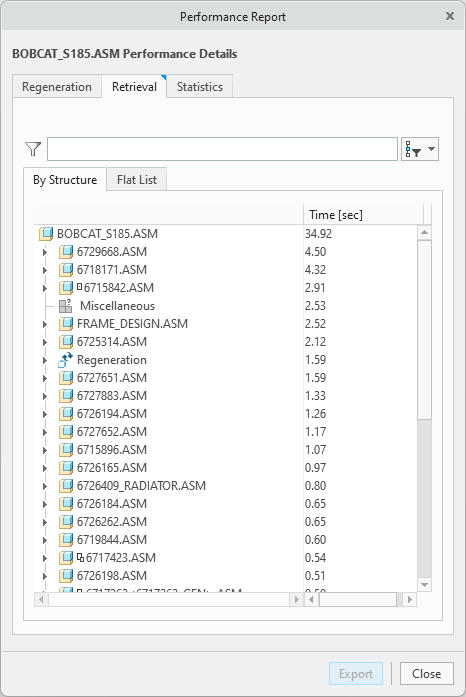
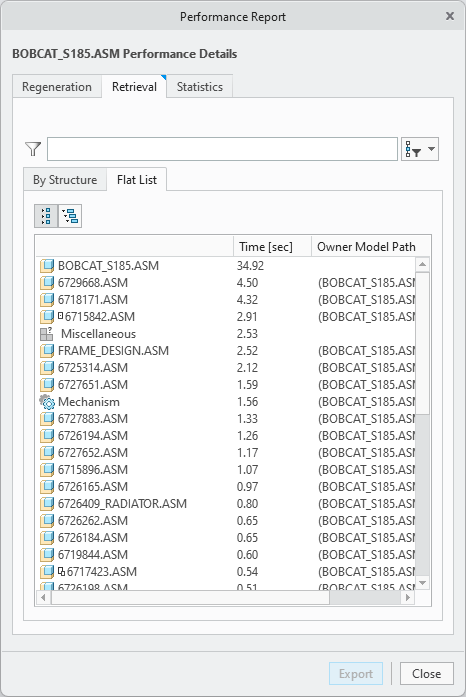
You can now review retrieval times for parts, assemblies, and other nodes such as Miscellaneous, with the Performance Report tool. The retrieval times of the objects retrieved to the active window are reported in the tool. By default, the list of components is sorted by their retrieval times. The largest contributors are at the top of the list. In addition to the structured view, where the subassemblies and parts can be expanded to show the sum of their content, the flat list provides an overview of all components and top-level nodes. Both the structured and flat lists can be searched.
Retrieval Report Structured list
Retrieval Report Flat list
Benefits
The ability to understand the retrieval time contribution of components and features of the retrieved item.
Additional Information
Tips: | None. |
Limitations: | Click the Related Link below |
Does this replace existing functionality? | No. |
Configuration option associated with this functionality: | measure_retrieval_time |