Geometry Search Tool in Assembly
Creo+
User Interface Location: Click > > , the geometry search tool becomes available for selecting references and creating search queries.
Videos
If the video does not play, watch it on YouTube.
Description
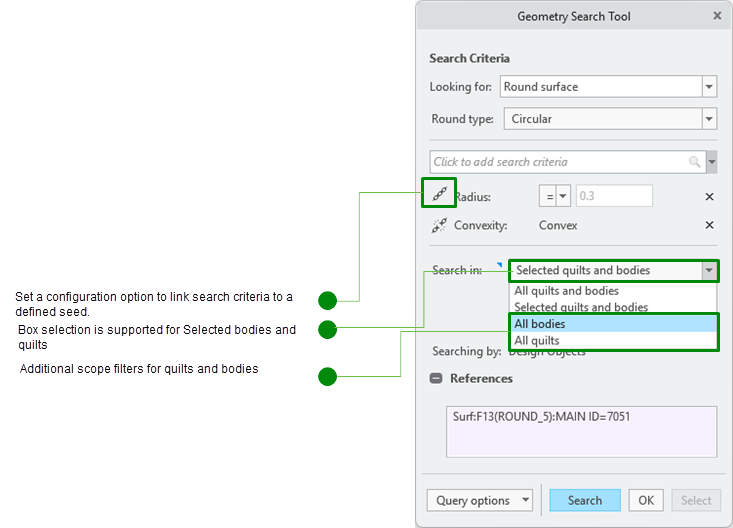
The geometry search tool is now available in the assembly context when you access it from an assembly-level datum reference feature. This allows you to perform a geometric search for surfaces across several models. The search scope is within the assembly that owns the datum reference feature. The search can be stored as a query in the assembly-level datum reference feature. The new configuration option geometry_search_tool_link allows to link search criteria to a defined seed by default. The Search in option was enhanced to include two more entities, All quilts and All bodies to search within bodies or quilts respectively. Box selection is supported for the Selected quilts and bodies option.
Benefits
Easily and efficiently capture and define semantic surface references for assembly-level annotations and PMI based on geometric search queries.
Additional Information
Tips: | None. |
Limitations: | • Surface collection rules still apply to a single quilt or body. • When the datum reference feature is defined as Assembly (in context), the Looking for option Shape surface is not available. • Geometric searches across an assembly only support situations involving components using the same unit system. |
Does this replace existing functionality? | No. |
Configuration option associated with this functionality: | geometry_search_tool_link |