Collaboration History
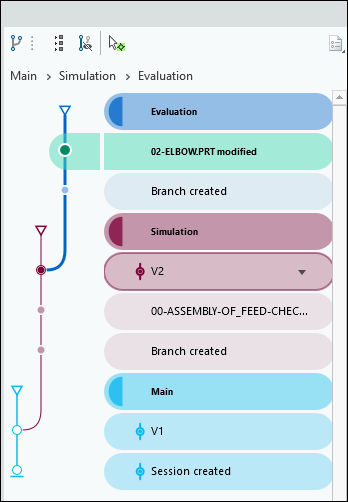
The state of a collaboration session is captured as changes made to a model by all users. The timeline of all changes captured in a collaboration session is presented in the form of Collaboration History. The change information is displayed in the form of changes and version. The changes made in versions and branches are recorded in the collaboration history. At any point of time, you can activate a change or a version from the collaboration history.
To Display the Collaboration History
To view the collaboration history for a model, on the top-right corner of the Creo+ window, click Collaboration History. The Collaboration History user interface appears alongside the Model Tree.
The following icons appear in the Collaboration History:
•  —Collapse all the branches in the collaboration history.
—Collapse all the branches in the collaboration history.•  —Hide or show inactive branches. Click to control the display of inactive branches in the collaboration history.
—Hide or show inactive branches. Click to control the display of inactive branches in the collaboration history.•  —Select and highlight the active change or version.
—Select and highlight the active change or version.The collaboration history also shows a navigation trail above the graph section. This navigation trail shows the hierarchical structure of the branches and their evolution from the main branch. Using the navigation trail, you can easily identify the current active branch and also navigate between various branches.
You can move the Collaboration History user interface and place it separately anywhere in the graphics window.