Windows Server OS での PTC Control Center のインストール
Windows Server OS を実行しているマシンに PTC Control Center をインストールする場合、「Turn off Windows Installer」グループポリシーを編集する必要があります。次の手順を実行します。
1. コントロールパネルで > に移動し、「Local Group Policy Editor」ウィンドウを開きます。
2. 「Local Computer Policy」 「Computer Configuration」 「Administrative Templates」 「Windows Components」 「Windows Installer」に移動します。
3. 「Turn off Windows Installer」設定を選択し、「Edit policy setting」をクリックします。
4. 「Enabled」ラジオボタンを選択します。
5. 「Options」ボックスのリストで「Never」を選択します。
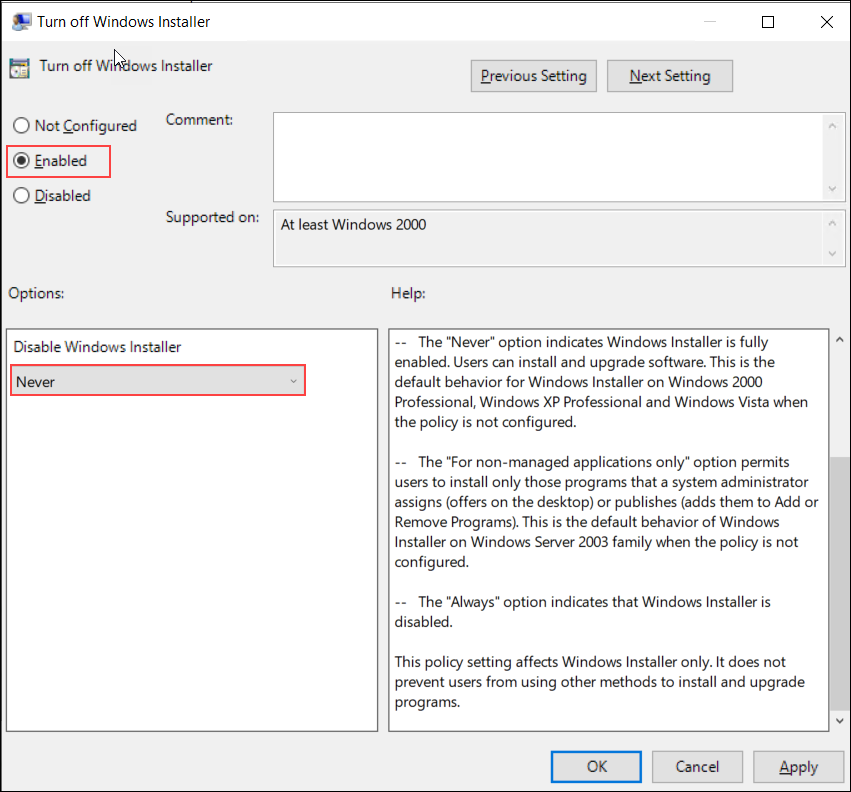
6. 「OK」をクリックしてポリシー設定に対する変更を保存します。
7. PTC Control Center のインストーラ PTCControlCenter.msi のインストールを続行できます。