Managing Users and Assigning Licenses (Admin)
The Creo Users page lists users in your organization and their details, such as email ID, role, assigned licenses, and last login. As an administrator, you can view users and assign or remove Advanced AI licenses from this page.
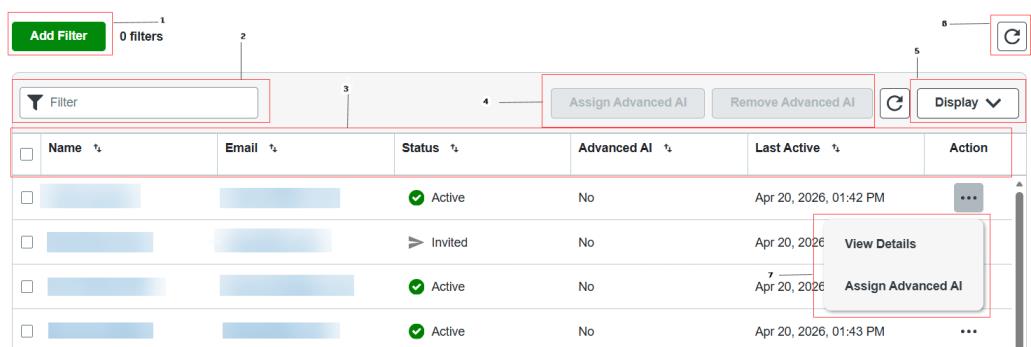
1. Add Filter—Enables you to search for users based on one or more filters.

When you add multiple filters, users are displayed based on the conditions in all the added filters.
2.  Filter—Type the name of a user to search for.
Filter—Type the name of a user to search for.3. User Information.
4. Assign and Remove the Advanced AI licenses.
5. Controls the user information to be displayed.
6. Refreshes the display.
7. Enables the following actions for a user:
View Details—Views license assignments for a selected user.
Assign Advanced AI—Assigns Advanced AI licenses to a selected user.
Assign or Remove the Advanced AI Licenses
To assign Advanced AI licenses, select a user and do one of the following:
• Click Assign Advanced AI.
• In the Actions column, click  and select Assign Advanced AI.
and select Assign Advanced AI.To remove an Advanced AI license, select a user and click Remove Advanced AI.