Load the Drawing
1. Type in: load \me10\pd_demos\demo03.mi' [Enter]
If this file is not on your system, use Creo Elements/Direct Drafting to generate it. Be sure to include all the dimensions and construction lines shown in following figure if you draw the part yourself.
2. Select Add Mult in ZONE and type in: all end [Enter] to load the part into the zone.
Demopart03
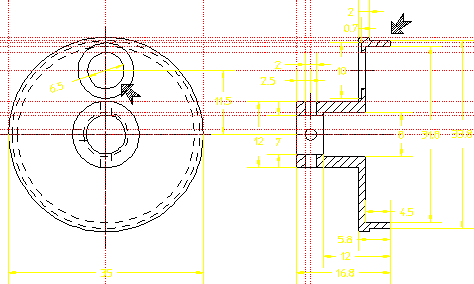
For this example, you will resize the hole and the ring indicated by the arrows in 図 303. Modifications to the large hole in the front face should carry over to the side view. Changing the width of the ring in the side view should change the radii of the hidden-line circles in the front view.
The main mechanism used to carry dimension information from one section of the part to the other is the construction line. When building this part, we included many construction lines whose only purpose was to link elements for Parametric Design. Look, for example, at the small hole in the side view. In most situations, it would be considered excessive to place horizontal and vertical construction lines on the perimeter as well as the center of this hole. For Parametric Design, however, these lines are critical: The vertical lines "link" the diameter of this hole with the two vertical holes in the side view, while the horizontal construction lines give us a link to the front view.