Mirroring
Creo Elements/Direct allows you to mirror a drawing using  Mirror.
Mirror.To save time when drawing symmetrical shapes, you can mirror them about a line of symmetry.
On the Modify tab, Mirror is usually used with the Keep check box clicked. The repeat factor is set to 1. Wait until your drawing is nearly complete before mirroring, otherwise you may miss a feature and have to draw it in both halves.
Mirror is usually used with the Keep check box clicked. The repeat factor is set to 1. Wait until your drawing is nearly complete before mirroring, otherwise you may miss a feature and have to draw it in both halves.To mirror a drawing:
1. Click Modify and then, in the General group, click Mirror.
Mirror.2. Click the required Mirror button and perform the associated procedure.
Mirror Button | Purpose | Procedure |
|---|---|---|
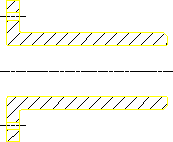
 2 Points 2 Points | Mirror a drawing about two points. | a. Specify two points to define the line of symmetry. b. Select the elements to be mirrored. The line of symmetry in Line of Symmetry is the dashed line. |
 Horizontal Horizontal | Mirror a drawing about a horizontal line. | a. Specify a point on the horizontal line of symmetry. b. Select the elements to be mirrored. |
 Vertical Vertical | Mirror a drawing about a vertical drawing. | a. Specify a point on the vertical line of symmetry. b. Select the elements to be mirrored. |
 Center Center | Rotate a drawing through 180 degrees. | a. Specify the center point of rotation. b. Select the elements to be mirrored. The elements are rotated 180 degrees in a clockwise direction. |
Line of Symmetry